-
-
January 26, 2023 at 6:36 am
-
January 26, 2023 at 4:01 pm
Ankush Choudhary
Ansys EmployeeHi, you can duplicate the second analysis while keeping the first.Â
-
January 26, 2023 at 4:03 pm
Sai Deogekar
Ansys EmployeeHello,
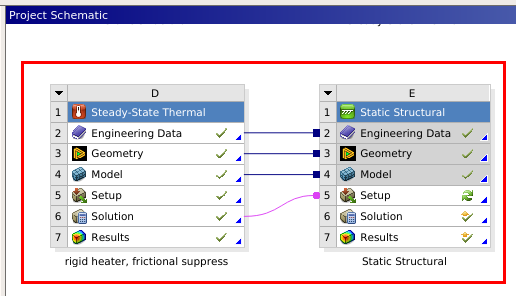
Do you wish to duplicate these two systems? Or do you wish to copy only these two systems to a fresh project (such that the new project only has these two systems)?
To duplicate: You can right-click on Cell 1 of System E (where "Static Structural" is written) and choose Duplicate. You then get the option to either retain the links to system D or create an independent system. Similarly, you can duplicate system D.
If you wish to copy these two systems to a fresh project, you can use the "Export System" option from the menu that shows up when you right-click.
Hope this helps.

-
January 27, 2023 at 6:04 am
Lee myungjun
SubscriberÂ
Thanks for your replies :)
The problem is
when duplicating E1 with links, then I got linked structure system to DÂ
,not with links, I got independent structure sytem.
But I wanna know how to duplicate the entire independent system of D & E with link each other.
Â
Â
-
January 27, 2023 at 10:01 am
a_l_o
SubscriberHi,
You can select both systems by "box selection", so drawing a rectangle including both systems with your mouse pointer (just as the red box in your screenshot), then right click and duplicate. This way, both systems will be copied as they are, but without any links to the original ones.
-
January 27, 2023 at 11:08 am
Lee myungjun
Subscriberit works!! thank you so much sir :)
-
January 27, 2023 at 12:23 pm
a_l_o
SubscriberWonderful! :D I am female, so no sir in this case please.
-
January 28, 2023 at 6:56 am
Lee myungjun
Subscriberoh, thanks ma'am =)
-
-
-
- The topic ‘How do I copy  connected Analysis systems’ is closed to new replies.
-
6625
-
1906
-
1469
-
1311
-
1022
© 2026 Copyright ANSYS, Inc. All rights reserved.