Ansys Assistant will be unavailable on the Learning Forum starting January 30. An upgraded version is coming soon. We apologize for any inconvenience and appreciate your patience. Stay tuned for updates.
General Mechanical

General Mechanical

Topics related to Mechanical Enterprise, Motion, Additive Print and more.

Import pressure data (coordinates and value) to ansys workbench through excel

    • Saeid Khadem Moshir
      Subscriber

      Hello,
      I have encountered a problem that how I can import coordinates and value of pressure into ansys workbench using an excel file. 
      Thank you 

    • Govindan Nagappan
      Ansys Employee

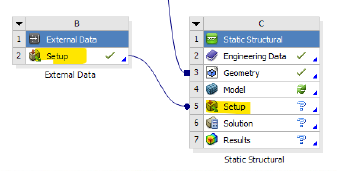
      You can import the excel file into external data and map it to structural model in Mechanical using "Imported load". The excel file can have  X , Y, Z coordinate and the pressure value. 

      Example schematic:

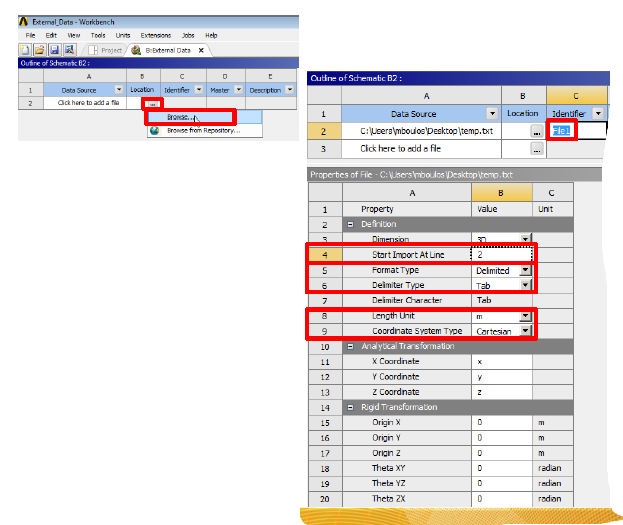
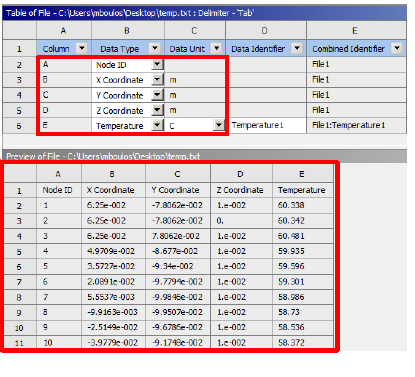
      Double click on the "set up" cell in external data and select the excel file and specify the details. You should see a preview of your data

      Sample preview that shows tempearute import

      You can then use Imported load inside Mechanical and apply the pressure on geometry

      Check help section: Imported Load (Group) (ansys.com)

      External Data (ansys.com)

    • 22sd06014
      Subscriber

      Could you please show the format of excel file which is imported. Column names etc. When I am importing I am not able to see the data in the excel file.

      Thanks in advance.

Viewing 2 reply threads
  • The topic ‘Import pressure data (coordinates and value) to ansys workbench through excel’ is closed to new replies.

[bingo_chatbox]