-
-
October 6, 2022 at 11:54 pm
reza121
SubscriberHello, I hope you are doing well.
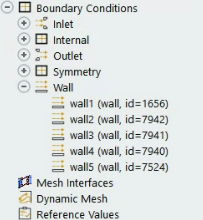
Is there any way to change the boundary conditions' IDs arbitrarily? I have multiple walls in my geometry and need better IDs to distinguish them in reports. I created my geometry using Design Modeler and meshed it by Fluent meshing. Please let me know if I need to make any modifications in those steps. Thanks
-
October 7, 2022 at 9:42 am
Rob
Forum ModeratorYou can use Named Selections in DM, those are usually (settings dependent) respected in Fluent Meshing. Or, in Fluent, open up the wall and change it's label. Note the label and ID are separate: the latter is a number generated within the case file and messing with that is a really bad idea. Note, changing the label may disrupt the Workbench workflow.
-
October 7, 2022 at 3:26 pm
reza121
SubscriberThanks for your reply, Rob.
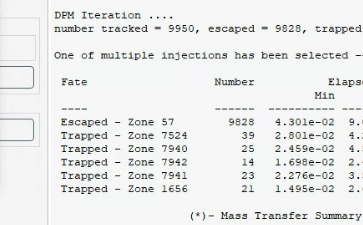
I know how to change the name of the boundaries and changing the IDs is my question. The reason for that is that when I get summary reports of my DPM to see which walls the particles were trapped on, it shows that based on the wall ID (not based on the wall name, sadly). Attached is a sample screenshot. For that, I have to refer to the boundary conditions list and decipher the wall ID every time. Worst of all, these IDs change in different cases in fluent and it seems that they are randomly generated. Do you have any solution for that?
Those zones that say the particles were trapped are the walls. But you can't say which of the walls 1 to 5 they are based on the IDs (e.g. 7524, 7940, ...)
-
October 7, 2022 at 3:48 pm
Rob
Forum ModeratorOther than using the summary files which then need addional post processing, no. If you open the Boundary Condition Task Page up (top image, double click on "Boundary Conditions") and click on each wall (no need to double click) the surface ID is posted in the Task Page.
I'll raise the point here, we've just got used to it but I'll see what the developer thinks.
-
October 10, 2022 at 2:03 pm
DrAmine
Ansys EmployeeDPM Summary based on Thread Name has been raised as suggestion request.
-
October 10, 2022 at 6:32 pm
reza121
Subscriber -
October 11, 2022 at 5:54 am
DrAmine
Ansys EmployeeThe enhancement request has been added into the next version.
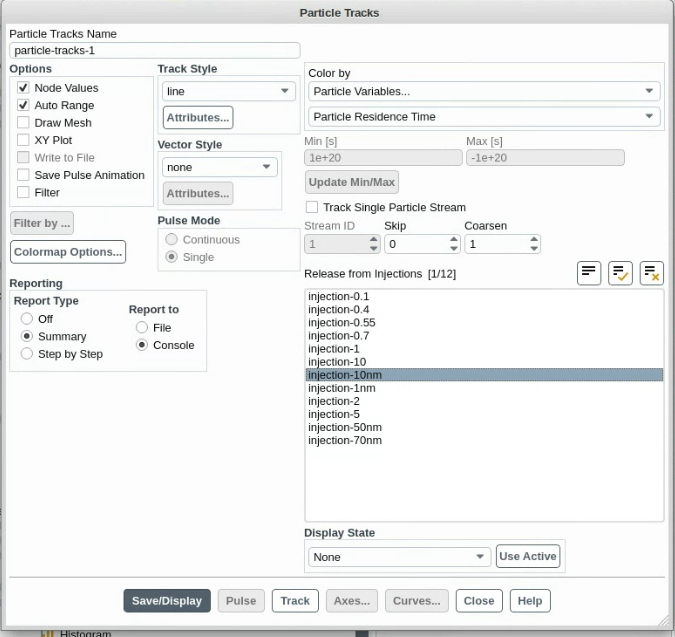
What you are showing you are just picking up an injection you want to get particle tracks /summary related to it.
-
- The topic ‘How to change a boundry condition ID in fluent’ is closed to new replies.

-
5799
-
1906
-
1419
-
1305
-
1021
© 2026 Copyright ANSYS, Inc. All rights reserved.