TAGGED: #fluent-#ansys, udf
-
-
August 10, 2022 at 7:46 am
eric1234598765
SubscriberHi, everyone
This is the problem about acessing cell value, such as C_U , C_T ,and so on , between two cells divided by an interface or interior.
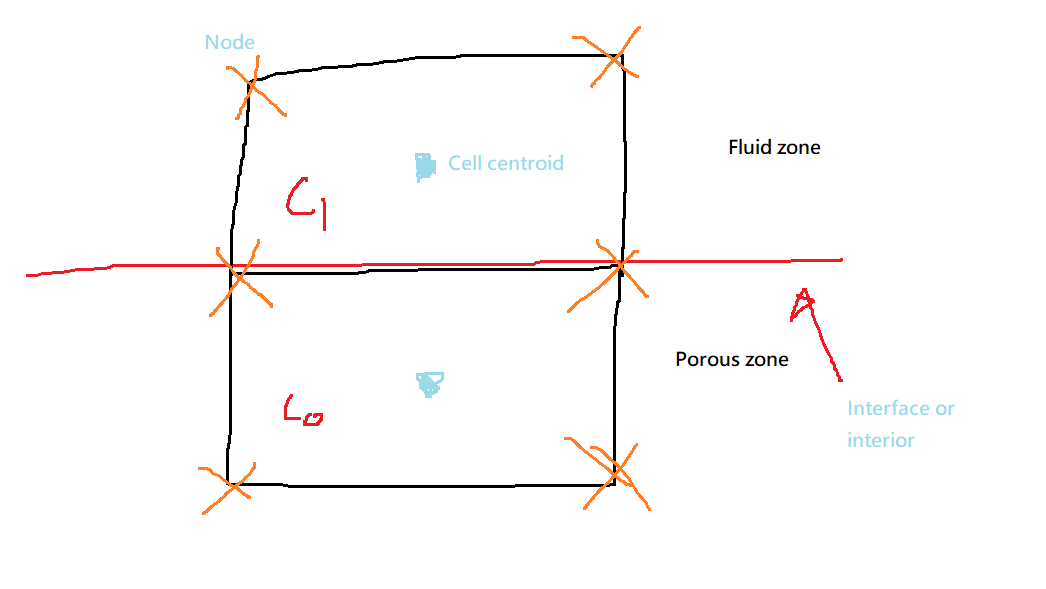
Picture below is a simple 2D mesh, the way I acess the cell centroid is providing a "Face thread" to UDF, which could be obtained from interface/interior ID. The problem is , which cell value did I actually get? Is the above one adjacent to the fluid zone, or the one adjacent to the porous zone?
P.S: There's only F_C0 and F_C1 in UDF Manual, which is not the cell value. Interstingly, I got the null value of F_C1 when I replaced F_U(c0,t0) with F_U(c1,t1).
Please help me to clarify which cell is chosen by UDF when the boundary is interface and interior, respectively.
Thanks a lot!
-
August 10, 2022 at 10:23 am
Rob
Forum ModeratorRemember "interface" and "interior" are different. For the former, it's an external boundary so only c0 exists, for an interior c0 and c1 are available.
Example 3, https://ansyshelp.ansys.com/account/Secured?returnurl=/Views/Secured/corp/v221/en/flu_udf/flu_udf_sec_define_dpm_bc.html shows it in use.
-
August 10, 2022 at 1:39 pm
eric1234598765
SubscriberHi Rob,
Thanls for the reply, I am clear on interface now.
However, I'm still not get it that which centroid Fluent would choose when using the cell macro , since there are two cells sharing one face only.
Altough the values of both cell centroid are nearly the same when they are small enough, it is better to make myself more clear about what ansys is doing.
Thanks
-
August 10, 2022 at 2:03 pm
eric1234598765
SubscriberAh..., Hi everyone,
I've checked the "c1" thread's ID by usnig THREAD_ID(t1) , which returns the cell zone value of porous, where
t1 = THREAD_T1(t);and t is the thread of the face boundary. This indicates that "c0' and "c1" in the above picture is upside down, and Fluent take cell adjacent to fluid zone as "c0" in this case.The other question about c1 is there is no value in "c1" cell when I called cell or face macro,which ends to SIGSEGV, altough THREAD_ID(t1) do return value.
Looking forward any help
Thanks!
-
August 10, 2022 at 2:36 pm
Rob
Forum ModeratorI think you'll need to look at some of the True/False options, that way if c1 isn't present the solver ought to skip any maths.
This might help too, https://ansyshelp.ansys.com/account/Secured?returnurl=/Views/Secured/corp/v221/en/flu_udf/x1-5160004.5.html
-
- The topic ‘Definition of “cell 0” and “cell 1” in UDF manual’ is closed to new replies.

-
6450
-
1906
-
1457
-
1308
-
1022
© 2026 Copyright ANSYS, Inc. All rights reserved.