Ansys Assistant will be unavailable on the Learning Forum starting January 30. An upgraded version is coming soon. We apologize for any inconvenience and appreciate your patience. Stay tuned for updates.
General Mechanical

General Mechanical

Topics related to Mechanical Enterprise, Motion, Additive Print and more.

“Unable to get working directory” error when using Solve() in script

    • K Kramer
      Subscriber

      I would like to automate my Mechanical simulation (including the solution process) via a Python script. However, if I type

      Model.Analyses[0].Solution.Solve(True)

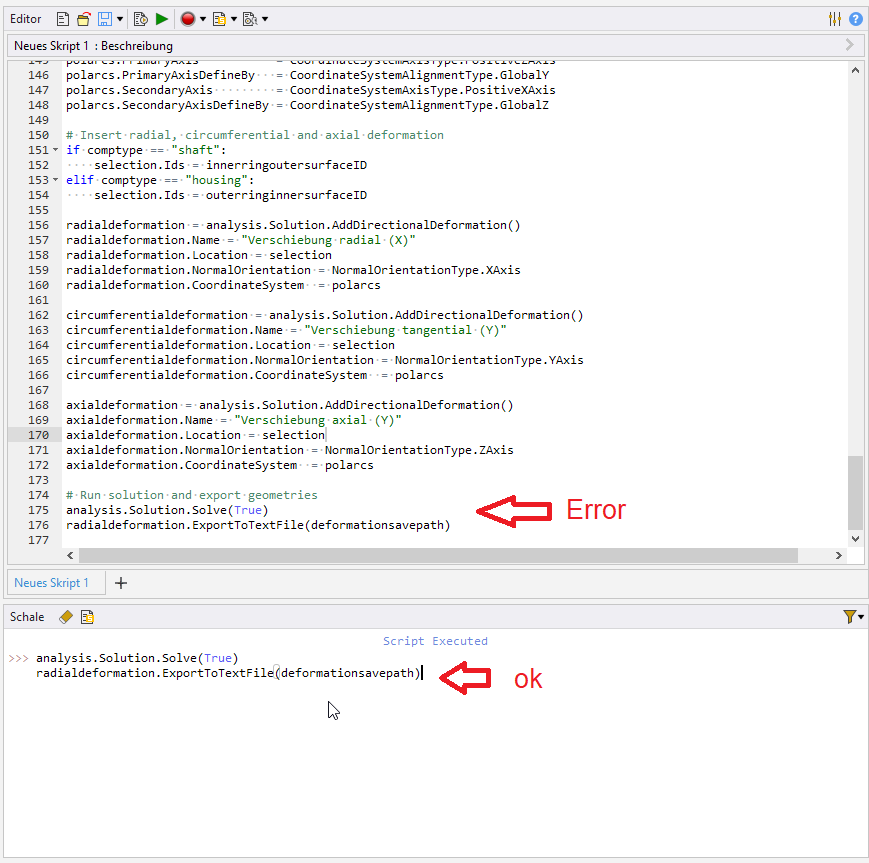
      in my script (this command can be found in the official scripting help under https://ansyshelp.ansys.com/account/secured?returnurl=/Views/Secured/corp/v221/en/act_script/act_script_examples_solve_track_core.html), I get an error reading "Unable to get working directory". Typing the same command in the shell works fine. Does anyone know a fix? This problem is very annoying since it forces me to always run the analysis manually.

    • Aniket Chavan
      Forum Moderator
      1. which version are you using? I am assuming it is 2022R1
      2. can you please add a screenshot of your mechanical window and where you are typing this in?

      -Aniket

    • K Kramer
      Subscriber
      1. 2022R1 is correct.
      2. See screenshot

    • Aniket Chavan
      Forum Moderator

      I am sorry but don't see any error in the shell... and what is the variable "defomationsavepath"?

      -Aniket

      How to access Ansys help links

      Guidelines for Posting on Ansys Learning Forum

Viewing 3 reply threads
  • The topic ‘“Unable to get working directory” error when using Solve() in script’ is closed to new replies.

[bingo_chatbox]