

-
-
May 19, 2022 at 10:47 pm
cktoh
SubscriberHi,
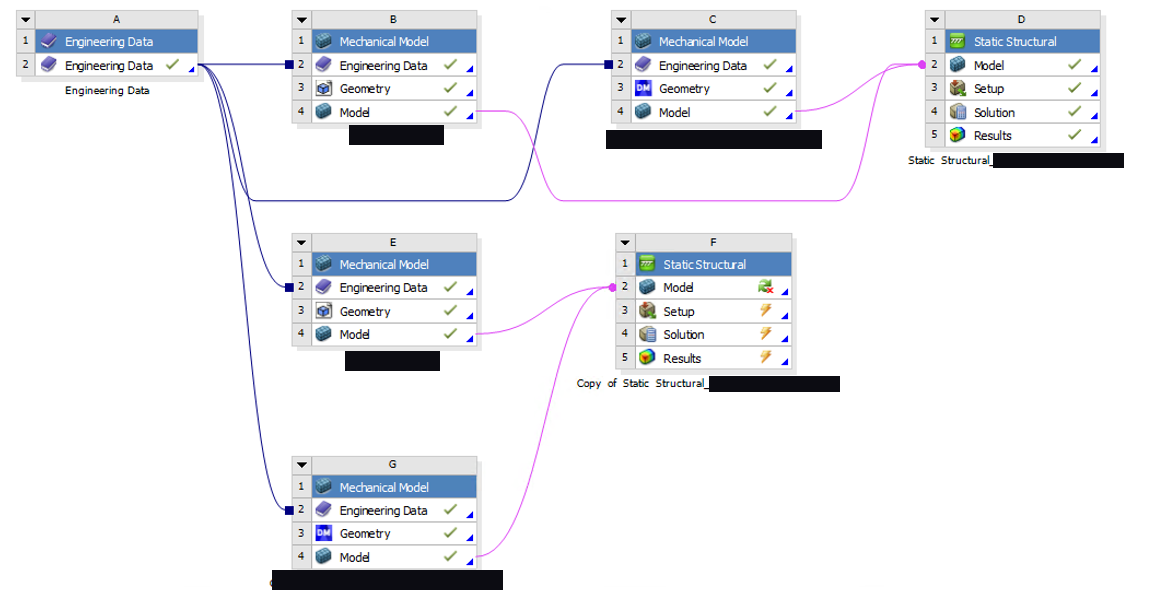
I got an error message "value cannot be null. Parameter name: container", after the following actions:
(1) Duplicating a chain of mechanical models and static structural blocks, from a solved models.
(2) Edit one of the mechanical models (Block E) in DesignModeler (move two bodies to be exact).
(3) Update and re-read upstream data on the duplicated static structural model (Block F).
(4) Got the error "value cannot be null. Parameter name: container"
Attached are the schematics of my workbench and the error message. Block E,G,F are duplicates from Block B,C,D respectively.
May 20, 2022 at 6:19 amerik.kostson
Ansys EmployeeHi
I would start to delete system F.
Add then a new static and not a copy of system D, and then connect system E and G to it (new static system).
Also read through this that might help:
Assembling External Models and Mechanical Models (ansys.com)
May 20, 2022 at 6:26 amSubscriber
Yes, creating a new system and reconnect it to E&G works, but that would require me to re-assign all the bodies and surfaces in boundary conditions, which is time consuming.
I am trying to avoid that by duplicating the whole chain of blocks. Do you have any further advise on that?
Viewing 2 reply threads- The topic ‘Value cannot be null. Parameter name: container’ is closed to new replies.
Innovation Space Trending discussions
 Top Contributors
-
peteroznewman
 6880
6880 -
scabo
 1906
1906 -
Dennis Chen
 1544
1544 -
javat33489
 1344
1344 -
NickFL
1217
Top Rated Tags
© 2026 Copyright ANSYS, Inc. All rights reserved.
Ansys does not support the usage of unauthorized Ansys software. Please visit www.ansys.com to obtain an official distribution.
-


The Ansys Learning Forum is a public forum. You are prohibited from providing (i) information that is confidential to You, your employer, or any third party, (ii) Personal Data or individually identifiable health information, (iii) any information that is U.S. Government Classified, Controlled Unclassified Information, International Traffic in Arms Regulators (ITAR) or Export Administration Regulators (EAR) controlled or otherwise have been determined by the United States Government or by a foreign government to require protection against unauthorized disclosure for reasons of national security, or (iv) topics or information restricted by the People's Republic of China data protection and privacy laws.

 You are navigating away from the AIS Discovery experience