

TAGGED: ansys-mechanical, result-visualization
-
-
May 5, 2022 at 2:18 am
mscal
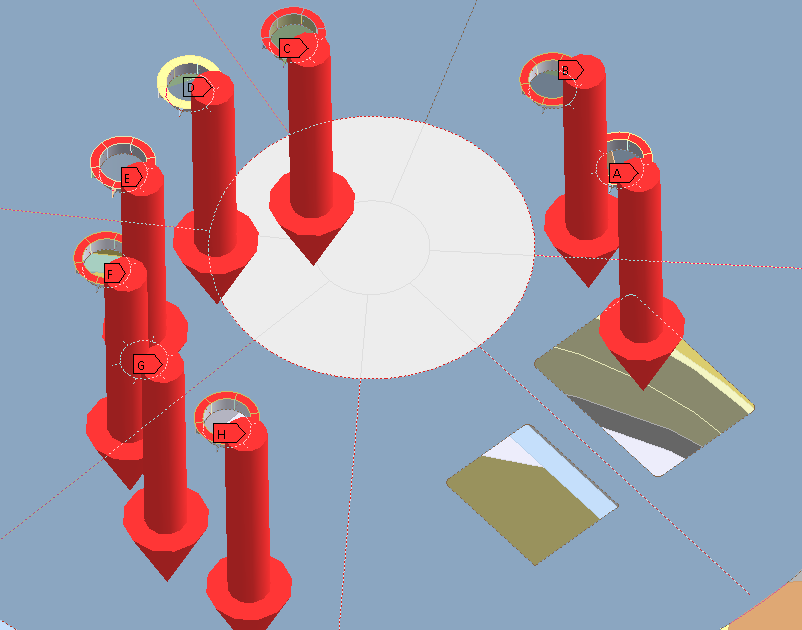
SubscriberTrying to export figures for reports, but the size of the 3D arrows that mechanical shows to represent the force (or moment) vector is gigantic today - larger than the surfaces to which the loads are applied. Some days it's very small. Anyone know how to control it?
May 5, 2022 at 4:12 amdinhan0394
SubscriberTry with Rescale button in Display tab.
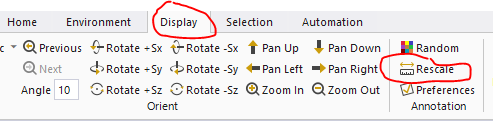
May 5, 2022 at 1:45 pmSubscriberPerfect, thank you! This was yet another nuisance issue that was kind of trivial, but happened frequently enough that it became a problem. Yet I couldn't find any documentation on the matter.
Viewing 2 reply threads- The topic ‘How do you control the load “arrow” size?’ is closed to new replies.
Innovation Space Trending discussions
 Top Contributors
-
peteroznewman
 6450
6450 -
scabo
 1906
1906 -
Dennis Chen
 1457
1457 -
javat33489
 1308
1308 -
Shyam Prasad V Atri
1022
Top Rated Tags
© 2026 Copyright ANSYS, Inc. All rights reserved.
Ansys does not support the usage of unauthorized Ansys software. Please visit www.ansys.com to obtain an official distribution.
-


The Ansys Learning Forum is a public forum. You are prohibited from providing (i) information that is confidential to You, your employer, or any third party, (ii) Personal Data or individually identifiable health information, (iii) any information that is U.S. Government Classified, Controlled Unclassified Information, International Traffic in Arms Regulators (ITAR) or Export Administration Regulators (EAR) controlled or otherwise have been determined by the United States Government or by a foreign government to require protection against unauthorized disclosure for reasons of national security, or (iv) topics or information restricted by the People's Republic of China data protection and privacy laws.

 You are navigating away from the AIS Discovery experience