

-
-
May 1, 2022 at 11:59 am
Haiquan
SubscriberHello
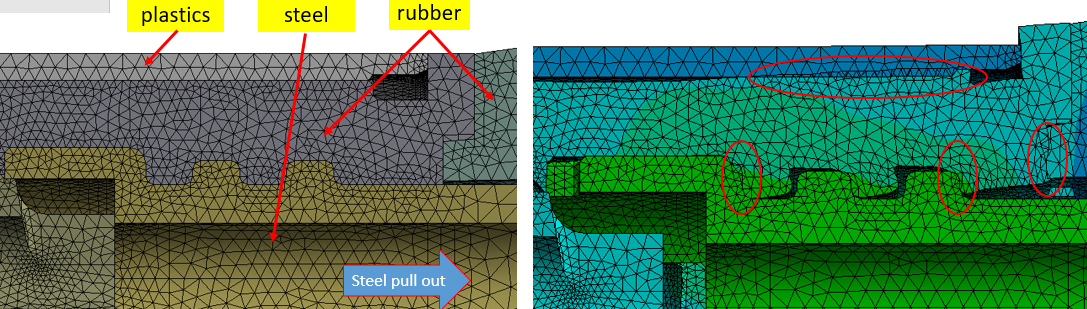
I am performing a quasi-static simulation in Explicit Dynamics, the steel(rigid behavior) is pulled out as shown below section. I use the Body Interactions(default setting) wit all bodies selected.
But during the calculation, large penetration is observed and it seems the contacts don’t work well even the mesh is refined. How this penetration can be avoided?
Thank you!
May 4, 2022 at 9:36 pmChris Quan
Ansys EmployeeThe contact penetrations may be related to mass scaling.
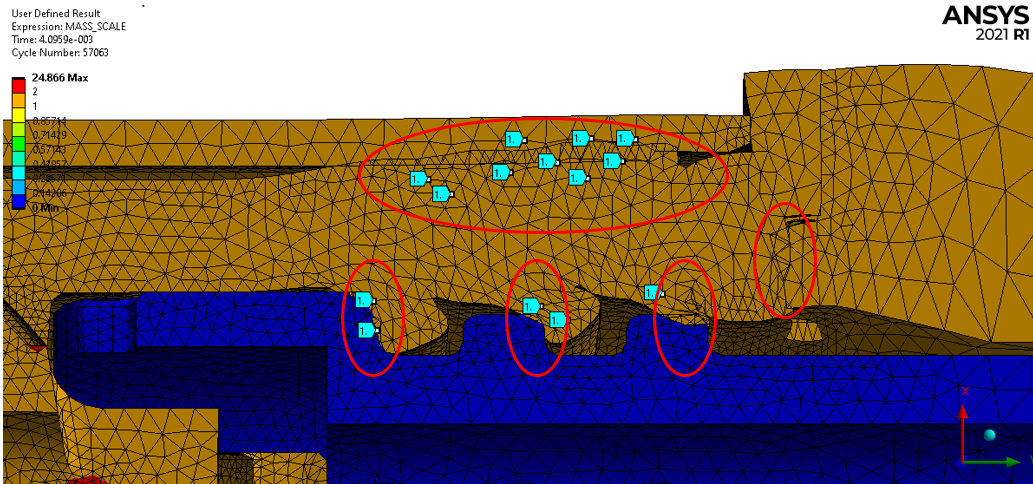
Can you plot user-defined variable Mass_Scale by right click on Solution and then click on Insert -> User Defined Results? Then in the field of Expression, enter MASS_SCALE to get the contour plot of mass scaling for the elements in All Bodies (default) or the selected bodies. Please make sure the "=" sign is not included in the expression.
Mass_Scale = 1 means no mass scaling in the elements. Mass_Scale >1 means the element mass has been increased.
Then check if the elements that have contact penetrations are the elements with Mass_Scale>1.
If yes, you can turn off mass scaling by setting Automatic Mass Scaling to No in Step Controls under Analysis Settings, and then re-run the model.
May 5, 2022 at 9:30 amSubscriberThank you very much for your feedback.
I plot theMass_Scale and found that there is no mass scaling in the penetration elements as shown below. Total mass added is 0.3%, the max mass added for individual parts is 6.9%.
I also turned off the mass scaling but the contact penetration is still present, and the CPU time needs 56 hours which is not acceptable!
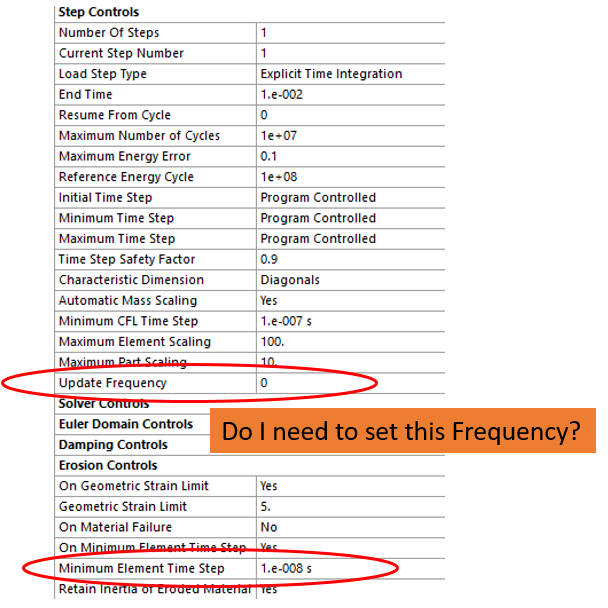
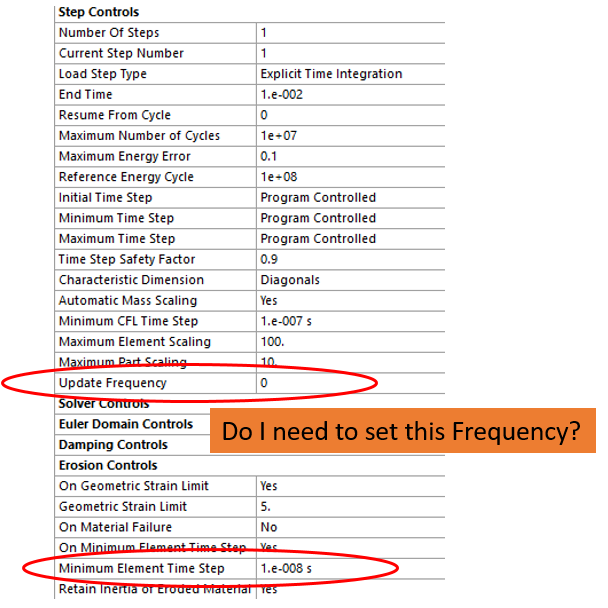
By the way, my calculation terminated at 46% due to Time Step Too Small. I tried to delete the element using Minimum Element Time Step as shown below figure, but it didnÔÇÖt work, this error of small time step was still present. Do I need to set Update Frequency in order to let ANSYS know current time step´╝î and delete the ones below this time step during the simulation?
May 10, 2022 at 1:13 amSubscriberAny more comment on my issue?
Viewing 3 reply threads- The topic ‘Contact penetration during quasi-static calculation in Explicit Dynamics’ is closed to new replies.
Innovation Space Trending discussions
 Top Contributors
-
peteroznewman
 6450
6450 -
scabo
 1906
1906 -
Dennis Chen
 1457
1457 -
javat33489
 1308
1308 -
Shyam Prasad V Atri
1022
Top Rated Tags
© 2026 Copyright ANSYS, Inc. All rights reserved.
Ansys does not support the usage of unauthorized Ansys software. Please visit www.ansys.com to obtain an official distribution.
-


The Ansys Learning Forum is a public forum. You are prohibited from providing (i) information that is confidential to You, your employer, or any third party, (ii) Personal Data or individually identifiable health information, (iii) any information that is U.S. Government Classified, Controlled Unclassified Information, International Traffic in Arms Regulators (ITAR) or Export Administration Regulators (EAR) controlled or otherwise have been determined by the United States Government or by a foreign government to require protection against unauthorized disclosure for reasons of national security, or (iv) topics or information restricted by the People's Republic of China data protection and privacy laws.

 You are navigating away from the AIS Discovery experience