Ansys Assistant will be unavailable on the Learning Forum starting January 30. An upgraded version is coming soon. We apologize for any inconvenience and appreciate your patience. Stay tuned for updates.
General Mechanical

General Mechanical

Topics related to Mechanical Enterprise, Motion, Additive Print and more.

Step Number and Step End time

    • mertturgut.senol
      Subscriber

      Dear Experts;

      I am trying to make a transient thermal anaysis to obtain residual stress due to welding process.

      I will make number of steps and i will apply different tempratures to every section in order to create welding speed.

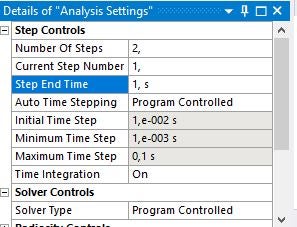
      But I cannot change step end time it stays always 1s. Is it possible to apply different step end time for the steps?

      thanks for your suggestions.

    • dinhan0394
      Subscriber
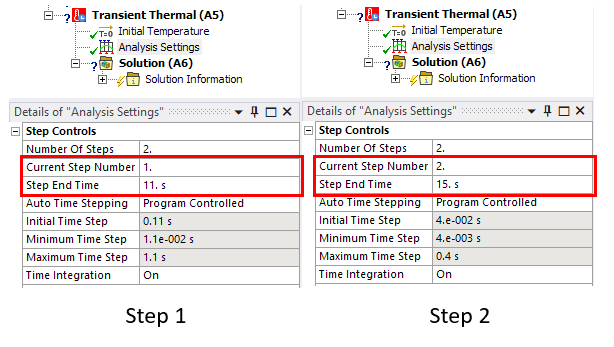
      Yes, you can change the Step End Time value as you want. In the case of multiple load steps, make sure that Step End Time in following step is greater than the previous step.
      Can you share your screen?


    • mertturgut.senol
      Subscriber
      it does not allow to change step time I am writing as 10 s but it makes 1 s. thank you for your reply and suggestions.
    • peteroznewman
      Subscriber
      You can't use 10 s for the end time of step 1 if the end time for step 2 is <10 s.
      Change the Current Step Number to 2, then make the end time for step 2 >10 s.
      Then change the Current Step Number of 1 and make the end time 10 s.
    • mertturgut.senol
      Subscriber
      Yes it worked. Thank you for your support and advice.
      in this situation the next step number should have bigger step end time tha previous one.
      Best regards.
Viewing 4 reply threads
  • The topic ‘Step Number and Step End time’ is closed to new replies.
[bingo_chatbox]