

TAGGED: ansys-student, ansys-workbench, license-error, licensing, workbench
-
-
February 23, 2022 at 7:06 am
sivakrishna
SubscriberHello,
I use ansys student 2022 R1 recently downloaded fresh copy with the inbuilt license.
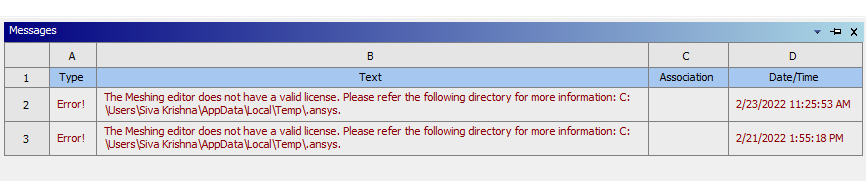
Since the past few days i have been facing this issue when i try to open meshing or space claim or any other apart from workbench.
February 25, 2022 at 6:30 pmGeorge Karnos
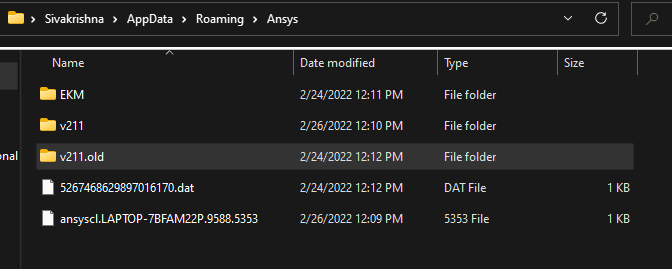
Ansys EmployeeTry renaming the %APPDATA%\Ansys\v221 directory to v221.old.
Now try to run.
February 26, 2022 at 6:47 amSubscriberThis is the error i see after doing that.
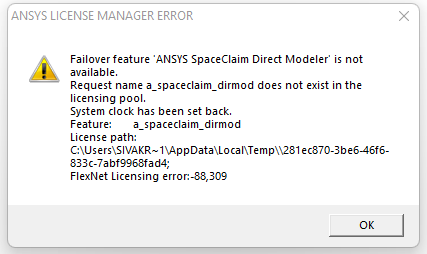
So, trying the meshing tool also gave the error. "The shared license is not available to perform the Geometry Attach operation".
Is it for some reason related to the empty space between the username ("siva krishna")? I have created another user with "SK" to check if its working but did not work either.
I can provide more info if required. Please help me out with this regards.
May 25, 2022 at 1:11 amiKay
SubscriberHi I'm a final year mechanical engineering student and my ansys is giving me a headache I will be very grateful if you would contact me on kkoa54@gmail.com
May 31, 2022 at 4:19 pmMo_96
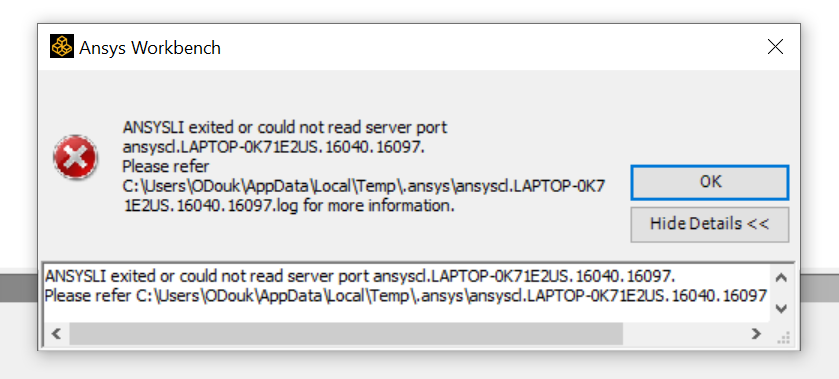
SubscriberHello Friend i also had a Problem with Ansys (Workbench). you can see the Error as a Screenshot. I hope someone can help me with this.
Viewing 4 reply threads- The topic ‘“Meshing editor does not have a valid license”’ is closed to new replies.
Innovation Space Trending discussions
 Top Contributors
-
peteroznewman
 6515
6515 -
scabo
 1906
1906 -
Dennis Chen
 1463
1463 -
javat33489
 1309
1309 -
Shyam Prasad V Atri
1022
Top Rated Tags
© 2026 Copyright ANSYS, Inc. All rights reserved.
Ansys does not support the usage of unauthorized Ansys software. Please visit www.ansys.com to obtain an official distribution.
-


The Ansys Learning Forum is a public forum. You are prohibited from providing (i) information that is confidential to You, your employer, or any third party, (ii) Personal Data or individually identifiable health information, (iii) any information that is U.S. Government Classified, Controlled Unclassified Information, International Traffic in Arms Regulators (ITAR) or Export Administration Regulators (EAR) controlled or otherwise have been determined by the United States Government or by a foreign government to require protection against unauthorized disclosure for reasons of national security, or (iv) topics or information restricted by the People's Republic of China data protection and privacy laws.

 You are navigating away from the AIS Discovery experience