

TAGGED: contact-region
-
-
February 17, 2022 at 6:37 am
dariomnava
SubscriberHi all,
I am trying to simulate a structure which consists of a lot of plates and structural elements. However, when I am trying to run the simulation I get the error "If one or more parts of the model are held together only by contact verify that the contact surfaces are closed. Also make sure that there are constraints (or friction) in the sliding direction even if no load is applied in that direction"
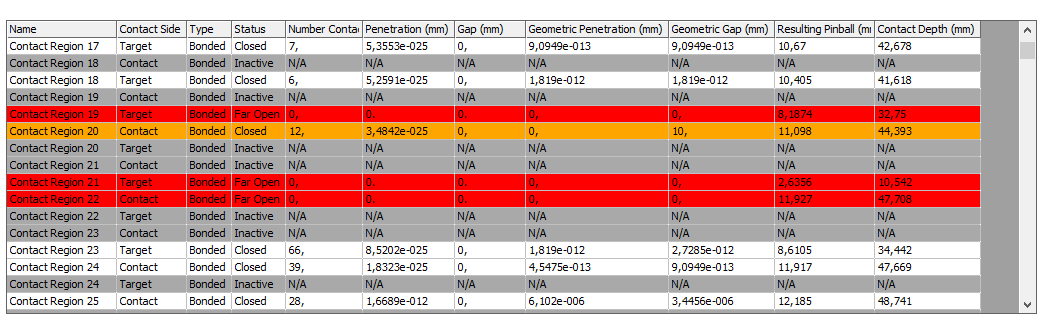
My concern is that it may be caused by open contact status between the elements. I used the contact tool and I got a lot of open contacts (for example contact region 19). Between these two bodies there is another plate which is 50mm thick and I do not understand why the software detects a possible contact
February 17, 2022 at 1:33 pmJohn Doyle
Ansys EmployeeIf these pairs were automatically generated and you do not want them in the model, you can tighten the Auto Detection Tolerance in the details window under the Contacts folder and regenerate to eliminate unwanted pairs or you could just manually delete the unwanted pairs.
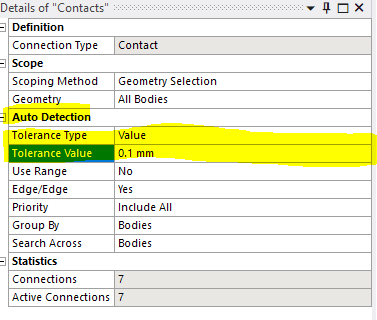 If you want to keep them as bonded, but ignore the gaps, you need to increase the pinball radius for each pair in question to a value that envelops the gap.
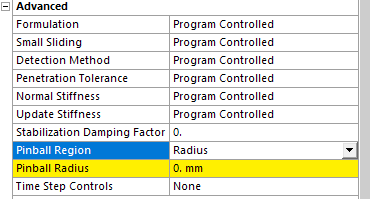 If you want to keep them but account for the gaps in the analysis, you need to change the Contact Type to a nonlinear behavior ( i.e. frictional or frictionless).
Viewing 1 reply thread- The topic ‘Contact region problem’ is closed to new replies.
Innovation Space Trending discussions
 Top Contributors
-
peteroznewman
 6485
6485 -
scabo
 1906
1906 -
Dennis Chen
 1458
1458 -
javat33489
 1308
1308 -
Shyam Prasad V Atri
1022
Top Rated Tags
© 2026 Copyright ANSYS, Inc. All rights reserved.
Ansys does not support the usage of unauthorized Ansys software. Please visit www.ansys.com to obtain an official distribution.
-


 You are navigating away from the AIS Discovery experience