

-
-
January 25, 2022 at 9:40 pm
soloviev
SubscriberHello,
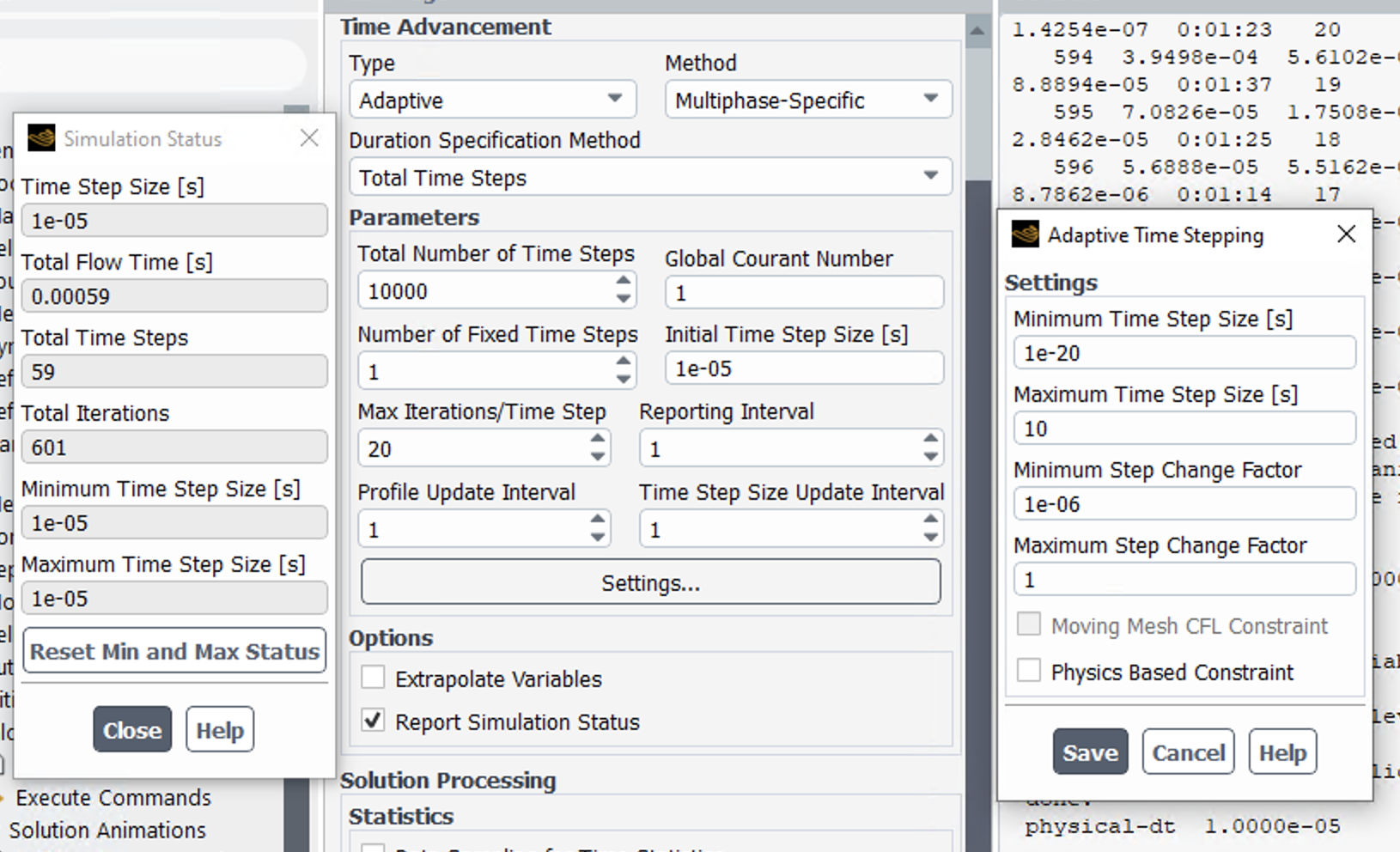
I have just recently started using 2022 R1 and am having issues with the adaptive time steps. I have used this method in previous releases without issue, but with 2022 R1 I am watching the simulation status and the timestep size is not adapting and eventually it leads to an error since I need a smaller time step size for my simulation (running one similar to I have in older releases, so I am familiar with the time step size being very small for convergence in the model). Here are the settings, I ensured that the minimum size and change factor can get smaller / adjust easily, and I had only 1 fixed time step set. Is there a setting I'm missing in this new release to get the adaptive time step to work?
Thanks,
Alex
January 26, 2022 at 7:24 amDrAmine
Ansys EmployeeWhat does your Courant Number tell (from Fluent Transcript) copy paste here an example?
Do you have Adaptive Mesh Refinement?
January 26, 2022 at 12:07 pmRob
Forum ModeratorCan you put the min/max change factors back to the default and try.
January 26, 2022 at 4:34 pmSubscriberDrAmine: The last output for Courant number is as follows: Global Courant Number [Variable Time Step Criteria] : 0.0425462
Rob: I reset the settings for min/Max back to the defaults and it appears to be working so far! Thank you!
January 27, 2022 at 9:40 amForum ModeratorYou're welcome. I think the values you picked meant the time step couldn't increase and the decrease was potentially so small it didn't register.
Viewing 4 reply threads- The topic ‘Fluent 2022R1 adaptive time steps not working’ is closed to new replies.
Innovation Space Trending discussions
 Top Contributors
-
peteroznewman
 6515
6515 -
scabo
 1906
1906 -
Dennis Chen
 1463
1463 -
javat33489
 1309
1309 -
Shyam Prasad V Atri
1022
Top Rated Tags
© 2026 Copyright ANSYS, Inc. All rights reserved.
Ansys does not support the usage of unauthorized Ansys software. Please visit www.ansys.com to obtain an official distribution.
-
Ansys Assistant will be unavailable on the Learning Forum starting January 30. An upgraded version is coming soon. We apologize for any inconvenience and appreciate your patience. Stay tuned for updates.


 You are navigating away from the AIS Discovery experience