

TAGGED: face-selection, no-tools, rotation-rotate
-
-
January 4, 2022 at 3:32 pm
SickOfAnsys
SubscriberIn Ansys Meshing, I am supposed to have this:
January 5, 2022 at 10:23 amKeyur Kanade
Ansys Employee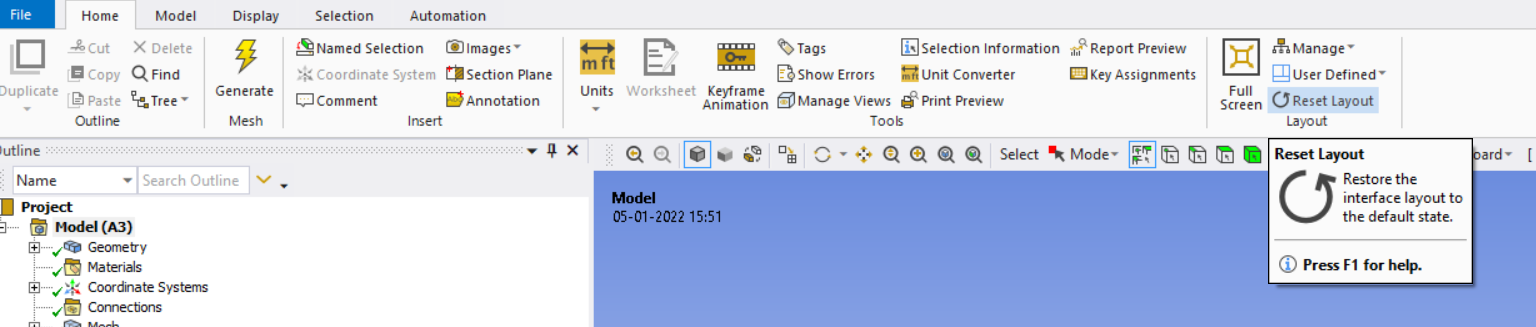
On right side you can see reset layout. Use it to restore interface.
Please go through help manual for more details
Keep Ctrl pressed while selecting more than one face.
Regards Keyur
How to access Ansys Online Help Document
Guidelines on the Student Community
January 5, 2022 at 11:00 amSubscriberThe reset layout did not return the the toolbar.
The steps necessary were to right click the ribbon and click to show the toolbar. This is now blank so you right click again and click the modify toolbar option. This opens a window with a dropdown menu. Scroll to near the bottom of the menu and you see the graphics menu options, click it and the tools appear in the left hand box. Select which graphics tools you require, and click to transfer to the toolbar box (this is written from memory as Ansys is currently performing calculations so I can't check the the correct options' names).
For the second question I put, in the question I explained that I was using ctrl+ click, THE ISSUE WAS PANNING AND ROTATING CAUSED THE PREVIOUSLY SELECTED FACES TO BECOME DESELECTED, I'm not sure how to make this any clearer.
Here's the solution. After orientating the geometry to expose the other faces that you wish to select, NO NOT CLICK SELECT FACE AGAIN, click the SINGLE SELECT (think that's what it is called) option instead. When clicking this option, the face select function is still highlighted and the previous faces remain selected. This may be caused by the Smart Select function, but I cannot check this until after the calculation is complete.
Viewing 2 reply threads- The topic ‘Accidentally deleted Tools Ribbon and difficulty in selecting faces’ is closed to new replies.
Innovation Space Trending discussions
 Top Contributors
-
peteroznewman
 6745
6745 -
scabo
 1906
1906 -
Dennis Chen
 1484
1484 -
javat33489
 1324
1324 -
NickFL
1067
Top Rated Tags
© 2026 Copyright ANSYS, Inc. All rights reserved.
Ansys does not support the usage of unauthorized Ansys software. Please visit www.ansys.com to obtain an official distribution.
-



The Ansys Learning Forum is a public forum. You are prohibited from providing (i) information that is confidential to You, your employer, or any third party, (ii) Personal Data or individually identifiable health information, (iii) any information that is U.S. Government Classified, Controlled Unclassified Information, International Traffic in Arms Regulators (ITAR) or Export Administration Regulators (EAR) controlled or otherwise have been determined by the United States Government or by a foreign government to require protection against unauthorized disclosure for reasons of national security, or (iv) topics or information restricted by the People's Republic of China data protection and privacy laws.

 You are navigating away from the AIS Discovery experience