

-
-
December 29, 2021 at 1:29 pm
Lotte
SubscriberHello everyone,
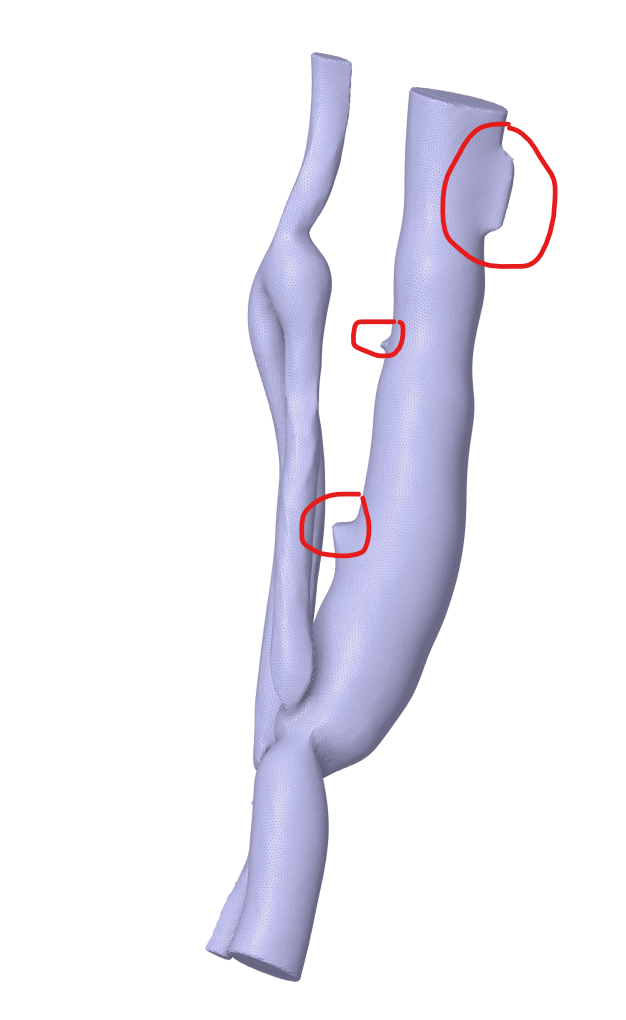
I am student who is new in using Ansys Spaceclaim. For my thesis I used software to substract a geometry for CT data (STL file). After this is, I am preparing the geometry in Spaceclaim for further assesment using Fluent. As can be seen in the picture, my geometry has quite some protrusions (red circles). Is there perhaps a function in Spaceclaim that would help me remove those structures? All tips are welcome!
Kind regards,
Lotte
December 29, 2021 at 3:46 pmpeteroznewman
SubscriberIn SpaceClaim, while the data is still in STL facet form, simply select the facets that are protruding and hit the delete key. That will create a hole in the facet body, but there is a repair tool that will find holes and fill them with new facets.
If you want more information, put the STL file in a .7z or .rar archive and attach it to your reply and say what version of ANSYS you are using.
December 29, 2021 at 4:37 pmSubscriberThankyou in advance for the help, I am using Ansys version 2021 R1.
December 29, 2021 at 7:53 pmSubscriberJanuary 3, 2022 at 3:31 pmSubscriberThank you very much for all your help! I just had one more question, is it possible to measure the diameter in a way in spaceclaim?
January 3, 2022 at 4:56 pmSubscriberI suggest you create a plane at the location you wish to approximately measure diameter, then you can create a sketch on that plane, then you can use the circle through three points and click three points on the object you are trying to measure. Then you can measure the circle.
Viewing 5 reply threads- The topic ‘Removing protrusions Spaceclaim’ is closed to new replies.
Innovation Space Trending discussions
 Top Contributors
-
peteroznewman
 5824
5824 -
scabo
 1906
1906 -
Dennis Chen
 1420
1420 -
javat33489
 1305
1305 -
Shyam Prasad V Atri
1021
Top Rated Tags
© 2026 Copyright ANSYS, Inc. All rights reserved.
Ansys does not support the usage of unauthorized Ansys software. Please visit www.ansys.com to obtain an official distribution.
-


The Ansys Learning Forum is a public forum. You are prohibited from providing (i) information that is confidential to You, your employer, or any third party, (ii) Personal Data or individually identifiable health information, (iii) any information that is U.S. Government Classified, Controlled Unclassified Information, International Traffic in Arms Regulators (ITAR) or Export Administration Regulators (EAR) controlled or otherwise have been determined by the United States Government or by a foreign government to require protection against unauthorized disclosure for reasons of national security, or (iv) topics or information restricted by the People's Republic of China data protection and privacy laws.

 You are navigating away from the AIS Discovery experience