-
-
December 29, 2021 at 11:25 am
sailaja
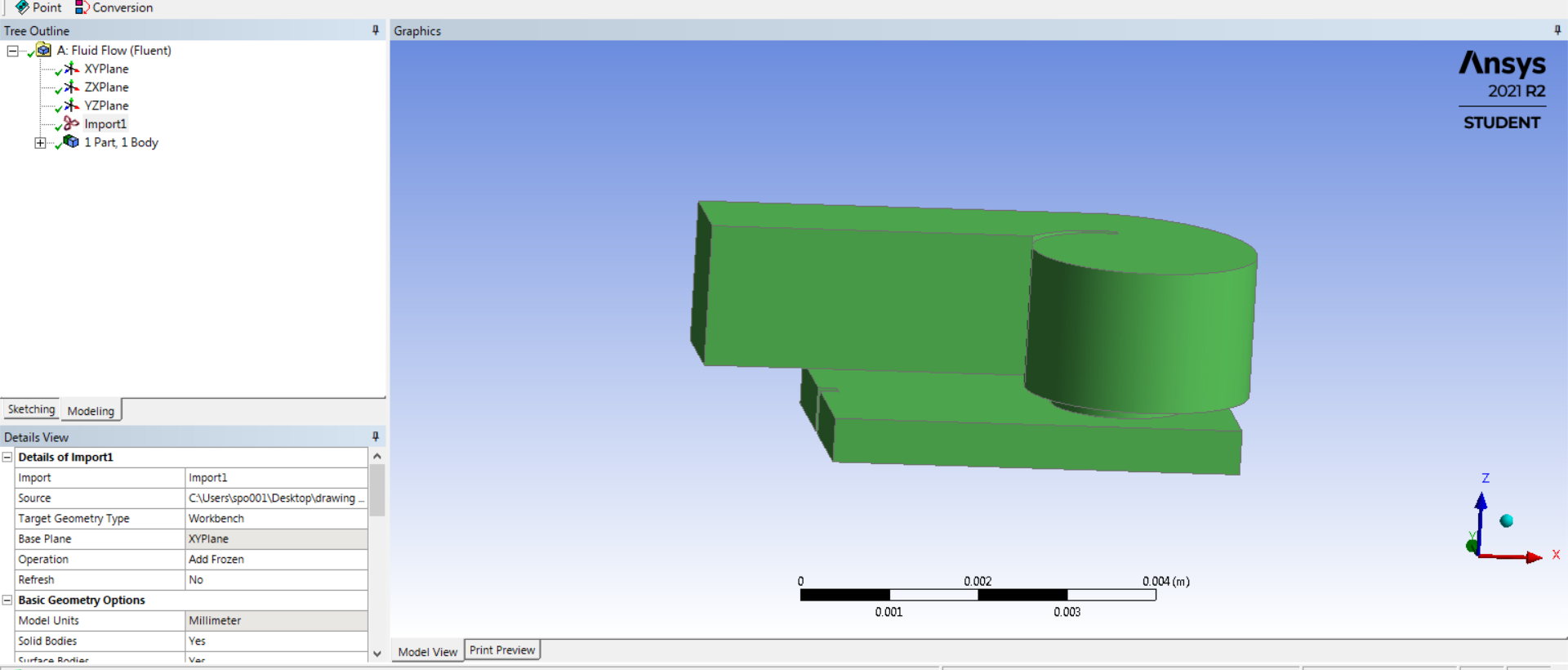
SubscriberI imported my geometry in the design modeler from AutoCAD. The drawing unit in AutoCAD was in meter. But in design modeler the unit of geometry is showing in mm (for example 1.3 m width is showing 1.3 mm in design modeler). I don't know why is this difference. I selected meter as unit in design modeler also but still my geometry unit is in mm. How can I make it to original unit to m ? The geometry is attached below .Suggestion please
Thank You in Advance.
December 30, 2021 at 8:52 amKeyur Kanade
Ansys EmployeeAs Ansys Staff, we can not download attachments. Please upload images using upload image functionality.
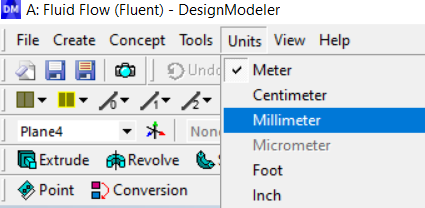
You can change units in DM
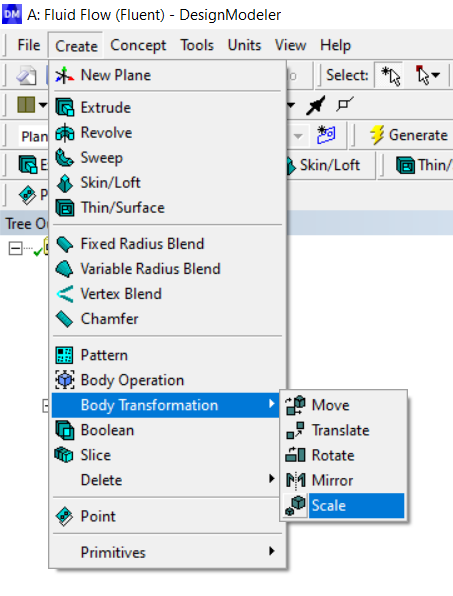
You can scale geometry in DM.
Regards Keyur
How to access Ansys Online Help Document
Guidelines on the Student Community
December 30, 2021 at 11:41 amSubscriberThank you . Did It.
December 31, 2021 at 12:37 pmRob
Forum ModeratorTo add, if you do get the wrong units, mesh to suit the wrong scale and fix in Fluent. Scaling CAD can cause problems depending on when/how tolerances are calculated. I suspect most staff have seen/made this mistake. I think the worst I've seen is a room with 140m/s updrafts: 9km was a little taller than planned.....
December 31, 2021 at 2:37 pmSubscriberHi Rob you mean I need to scale my mesh size in scale mesh in fluent solver not the geometry in design modeler ? for example my geometry width is 1.35 m and its showing 1.35 mm. Now the thing is if I generate mesh of 0.01 mm and scale in fluent solver in scale mesh by 1000 then my mesh size will be 10mm , right? So, when I open solver my geometry which is in mm when imported to ANSYS will be automatically in m? That's why I have to scale my mesh size only ?
Than you in Advance.
January 4, 2022 at 4:58 pmForum ModeratorOpening CAD in another tool means trusting the conversion software: which can do what you're seeing where mm-m-km get muddled up. In your case, using a small cell size and then scaling in Fluent means the cells will also scale. "Ansys" is the company, you'll be reading geometry into SpaceClaim/DesignModeler and then Ansys (Workbench) Meshing/Fluent Meshing then Fluent. Don't worry too much what size Fluent thinks, just check and then adjust the scale (SCALE not UNITS) to ensure your domain is the correct size.
January 10, 2022 at 11:04 pmSubscriberThank you .
Viewing 6 reply threads- The topic ‘Geometry units’ is closed to new replies.
Innovation Space Trending discussions
 Top Contributors
-
peteroznewman
 5874
5874 -
scabo
 1906
1906 -
Dennis Chen
 1420
1420 -
javat33489
 1306
1306 -
Shyam Prasad V Atri
1021
Top Rated Tags
© 2026 Copyright ANSYS, Inc. All rights reserved.
Ansys does not support the usage of unauthorized Ansys software. Please visit www.ansys.com to obtain an official distribution.
-


The Ansys Learning Forum is a public forum. You are prohibited from providing (i) information that is confidential to You, your employer, or any third party, (ii) Personal Data or individually identifiable health information, (iii) any information that is U.S. Government Classified, Controlled Unclassified Information, International Traffic in Arms Regulators (ITAR) or Export Administration Regulators (EAR) controlled or otherwise have been determined by the United States Government or by a foreign government to require protection against unauthorized disclosure for reasons of national security, or (iv) topics or information restricted by the People's Republic of China data protection and privacy laws.

 You are navigating away from the AIS Discovery experience