-
-
December 23, 2021 at 2:49 am
Van Toan Nguyen
SubscriberHello everyone,
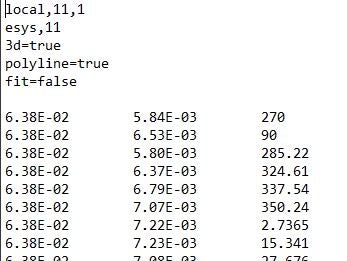
I want to import my geomertry into Spaceclaim. My point coordinates are in order of (Z, X, Y) (Z,X,Y are coordinates in Cylindrical Coordinate system). I followed this discussion /forum/discussion/8629/generating-a-surface-from-a-point-cloud-and-make-a-solid-out-of-it
My question is: Which command must be added If we want to work with Cylindrical Coordinate System?
Thanh you so much!
December 23, 2021 at 7:16 amVinayak Vipradas
Ansys Employee
To use Cylindrical Coordinate System, you can use the following commands:
local,11,1 !! for creating a cylindrical local coordinate system and assigning its id as 11
esys,11 !! assigning element system as 11, above created cylindrical system
For further information on Cylindrical Coordinate System, please refer to the following link:
Coordinating Coordinate Systems in ANSYS Mechanical ÔÇô PADT, Inc. ÔÇô The Blog (padtinc.com)
Regards Vinayak
Ansys Help
Ansys Learning Forum (Rules & Guidelines)
December 23, 2021 at 8:35 amVan Toan Nguyen
Subscriber@vviprada
Thank you for your reply.
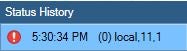
I meant that Cylindrical Coordinate System is in Spaceclaim (the data points are already in Cylindrical Coordinate). I tried with your command but It did not work.


December 23, 2021 at 1:55 pmVinayak Vipradas
Ansys Employee
For SpaceClaim, you can not import point curve data directly in the Cylindrical Coordinate System. But you can simply import the data in excel first and then convert it to Cartesian and then import in SpaceClaim.
Regards Vinayak
Ansys Help
Ansys Learning Forum (Rules & Guidelines)
Viewing 3 reply threads- The topic ‘Import Point Curve text file into Spaceclaim with Cylindrical Coordinate System.’ is closed to new replies.
Innovation SpaceTrending discussionsTop Contributors-
6650
-
1906
-
1469
-
1312
-
1022
Top Rated Tags© 2026 Copyright ANSYS, Inc. All rights reserved.
Ansys does not support the usage of unauthorized Ansys software. Please visit www.ansys.com to obtain an official distribution.
-
Ansys Assistant will be unavailable on the Learning Forum starting January 30. An upgraded version is coming soon. We apologize for any inconvenience and appreciate your patience. Stay tuned for updates.