

TAGGED: ansys-student, ansys-workbench, designmodeler, fluent
-
-
November 13, 2021 at 4:53 pm
losinyao181031
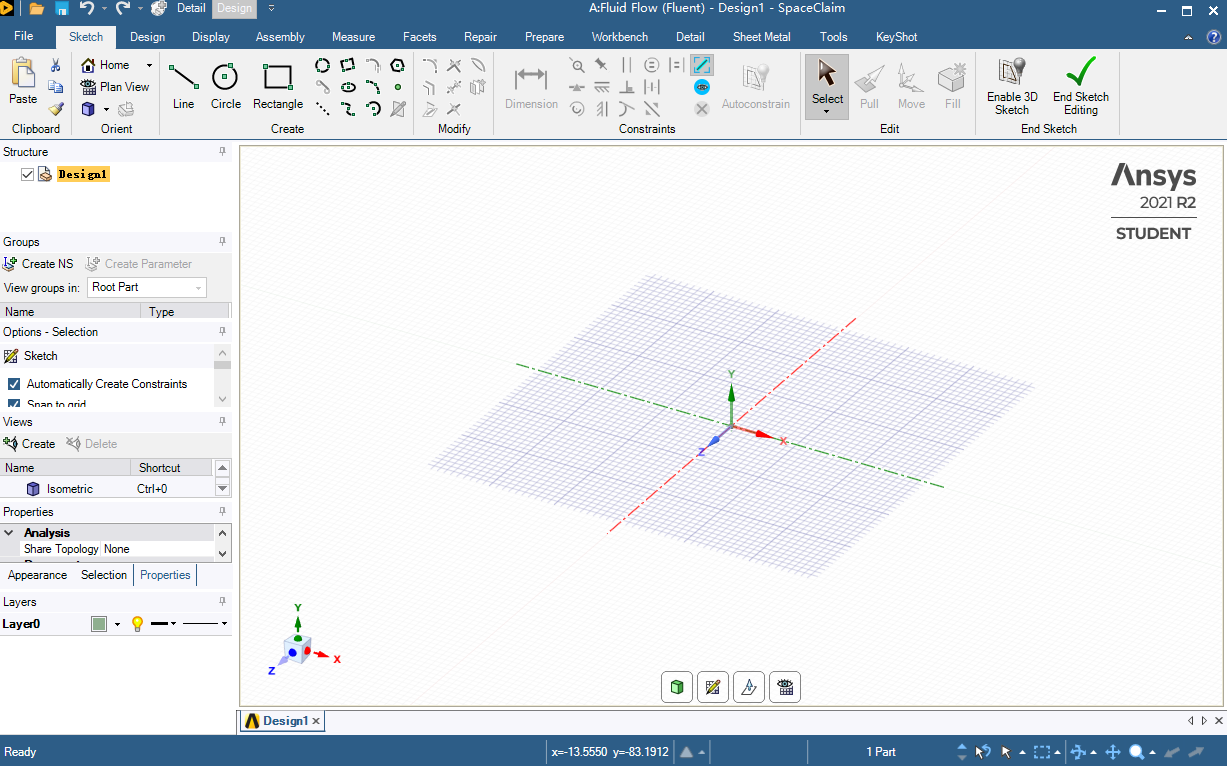
SubscriberThat is a big question for me and i ve worked on it for 2 days. I am using the Student Version 2021R2 of ANSYS Fluent and in the design modeler, the "details view" tab has completely disappeared and even "tree/outline" too. i tried to Reset workplace and Reset window layout on workbench, but they didn't work. So what can i do for fix it ? Please help me. And there are screen shot of my DM work place.
November 13, 2021 at 9:28 pmRob
Forum ModeratorThat's SpaceClaim, not DesignModeler.
November 14, 2021 at 1:54 pmSubscriber
Thanking for ur answer! i am a beginer for use ANSYS product, so i try to learn it.And could u plz tell me how to open the DesignModeler? When I double-click on geometry, it opened SC, and i need use DM. How can i set it ?
November 15, 2021 at 9:21 amForum ModeratorIf you right click on the Geometry as you're doing there should be options for DM and SC.
Viewing 3 reply threads- The topic ‘details view/tree/outline completely disappeared ANSYS 2021R2’ is closed to new replies.
Innovation Space Trending discussions
 Top Contributors
-
peteroznewman
 6520
6520 -
scabo
 1906
1906 -
Dennis Chen
 1463
1463 -
javat33489
 1311
1311 -
Shyam Prasad V Atri
1022
Top Rated Tags
© 2026 Copyright ANSYS, Inc. All rights reserved.
Ansys does not support the usage of unauthorized Ansys software. Please visit www.ansys.com to obtain an official distribution.
-


The Ansys Learning Forum is a public forum. You are prohibited from providing (i) information that is confidential to You, your employer, or any third party, (ii) Personal Data or individually identifiable health information, (iii) any information that is U.S. Government Classified, Controlled Unclassified Information, International Traffic in Arms Regulators (ITAR) or Export Administration Regulators (EAR) controlled or otherwise have been determined by the United States Government or by a foreign government to require protection against unauthorized disclosure for reasons of national security, or (iv) topics or information restricted by the People's Republic of China data protection and privacy laws.

 You are navigating away from the AIS Discovery experience