TAGGED: ansys-apdl, beams-element, diagram
-
-
November 10, 2021 at 11:03 am
DFC_URJC
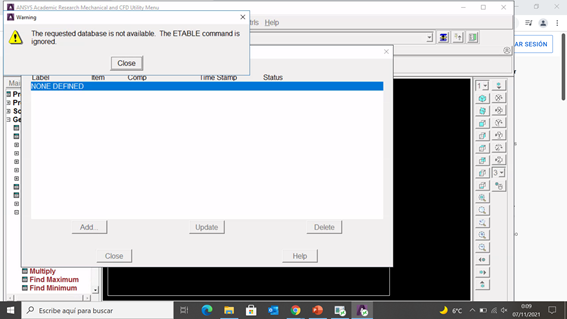
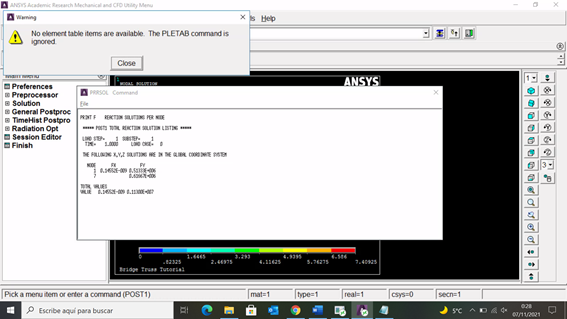
SubscriberDear friends, I used Ansys some time ago, now I use Ansys2020R2 (Educational version). I used to draw beams SF and M diagram with "ETABLE". I used SMISC. I have also used youtube tutorials, for example https://www.youtube.com/watch?v=wJ2bcol-17A. However Ansys2020R2 send me an error and it does not draw me the diagram. Can you help me? I do not know which is my error. Best. D.
November 10, 2021 at 2:43 pmVigneswaran Sridharan
Ansys EmployeeHi It will be helpful if you can share a screenshot of the error.
Also, I suggest you check on the element type and the command syntax.
BEAM188 (ansys.com)
ETABLE (ansys.com)
Vigneswaran
November 10, 2021 at 5:27 pmNovember 15, 2021 at 12:42 pmVigneswaran Sridharan
Ansys EmployeeHi Sorry for the delay.
I suggest you begin your workflow by clearing the database.
Either type "/clear" in the command prompt or GUI - "Clear and start new" from the file menu.
You should be able to draw the shear force and bending moment diagram using 'BEAM188' following the video you attached.
If you had created the beam through Keypoints, apply loads on KP and not on nodes.
Hope this helps!
Vigneswaran
November 15, 2021 at 6:04 pmDFC_URJC
SubscriberThank so much for your help Vigneswaran I have tried it and no result! I do not know what can happened with the program. First time in live and I have used it for years. Best. D.
Viewing 4 reply threads- The topic ‘Ansys APDL – Beam SF and M diagram’ is closed to new replies.
Innovation SpaceTrending discussionsTop Contributors-
5879
-
1906
-
1420
-
1306
-
1021
Top Rated Tags© 2026 Copyright ANSYS, Inc. All rights reserved.
Ansys does not support the usage of unauthorized Ansys software. Please visit www.ansys.com to obtain an official distribution.
-