

TAGGED: anys-mechanical, spaceclaim-directmodeler
-
-
November 2, 2021 at 4:59 pm
pbuelow
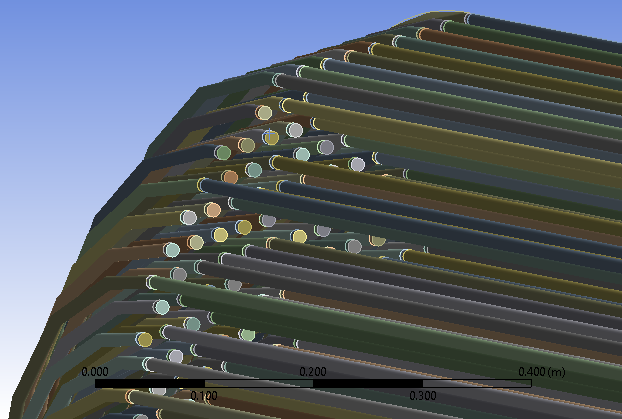
SubscriberParticular bodies are missing from geometry when moving from Spaceclaim to ANSYS Mechanical. The absence appears to be dependent on the shared topology. In Figure 1, ”shared topology” is ON and particular tubes are missing in ANSYS Mechanical. Note, all bodies are ”activated for physics” and no bodies have been suppressed. In Figure 2, ”shared topology” is OFF and no bodies are missing.
November 5, 2021 at 3:02 pmGary_S
Ansys EmployeeShared topology is a Geometry "merge" operation. It operates on a tight tolerance, and requires very clean, precise geometry input.
If the merge operation fails, or if the merged part does not pass the validation test, the part disappears like you see. Often times just moving the parts slightly closer or further will allow the merge to succeed.
Your geometry is very complex, and it may not be practical to manually move or adjust each part.
It may be worth looking into a Node Merge
Node Merge is a mesh editing tool that enables you to merge mesh nodes within a specified tolerance, making the mesh conformal across bodies, parts, and assemblies. Node merge can be used in conjunction with Node Move to remove large gaps in meshes without degrading mesh quality significantly. Node Merge can be performed on solid, sheet, and line bodies.
Viewing 1 reply thread- The topic ‘SpaceClaim: Absent geometry when imported into Mechanical’ is closed to new replies.
Innovation Space Trending discussions
 Top Contributors
-
peteroznewman
 5874
5874 -
scabo
 1906
1906 -
Dennis Chen
 1420
1420 -
javat33489
 1306
1306 -
Shyam Prasad V Atri
1021
Top Rated Tags
© 2026 Copyright ANSYS, Inc. All rights reserved.
Ansys does not support the usage of unauthorized Ansys software. Please visit www.ansys.com to obtain an official distribution.
-


The Ansys Learning Forum is a public forum. You are prohibited from providing (i) information that is confidential to You, your employer, or any third party, (ii) Personal Data or individually identifiable health information, (iii) any information that is U.S. Government Classified, Controlled Unclassified Information, International Traffic in Arms Regulators (ITAR) or Export Administration Regulators (EAR) controlled or otherwise have been determined by the United States Government or by a foreign government to require protection against unauthorized disclosure for reasons of national security, or (iv) topics or information restricted by the People's Republic of China data protection and privacy laws.

 You are navigating away from the AIS Discovery experience