Ansys Assistant will be unavailable on the Learning Forum starting January 30. An upgraded version is coming soon. We apologize for any inconvenience and appreciate your patience. Stay tuned for updates.
Announcement
The Next Generation of Ansys Innovation Space is Here.
This AI-powered platform delivers a smarter, faster, and more personalized experience for learning, support, and community engagement.
You will be automatically redirected to the Next Gen Ansys Innovation Space (https://innovation.ansys.com) shortly.
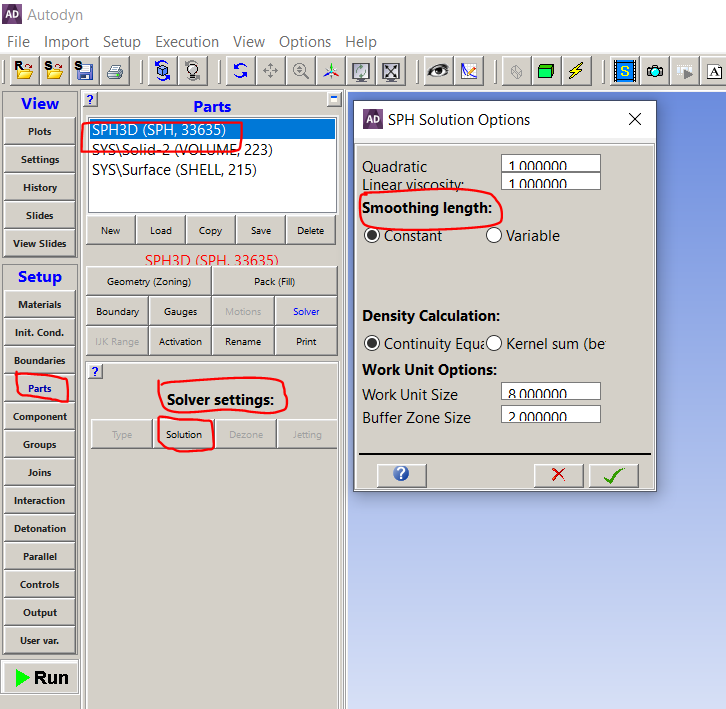
How do I change the smoothing length of SPH Meshing in Ansys work bench ?
How do I change the smoothing length of SPH Meshing in Ansys work bench ?
October 30, 2021 at 5:10 pm
vamsijc7
Subscriber
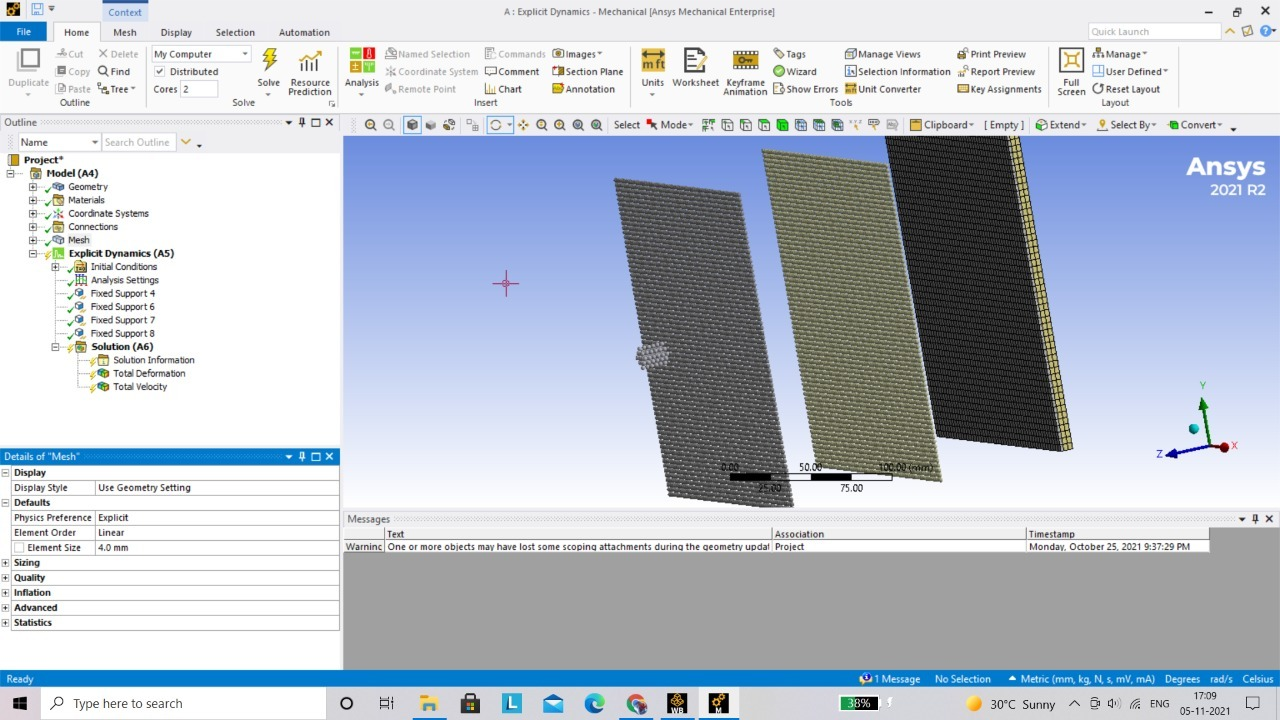
I am not able to find the right options to change the smoothing length constant as a beginner. Do help me out.
November 1, 2021 at 11:16 am
Akshay Maniyar
Ansys Employee
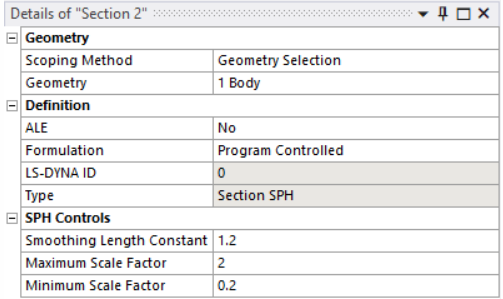
If you insert a Section object from the LSDYNA Pre tab and scope the section to a particle body, the SPH Controls section appears in the Details panel and includes 3 parameters as shown in the figure below: regards
Amaniyar
November 2, 2021 at 7:19 am
vamsijc7
Subscriber
How to insert a Section object from the LSDYNA Pre tab ?
Can you please elucidate with some pictures or sentences ?
Thanks.
November 2, 2021 at 8:16 am
Akshay Maniyar
Ansys Employee
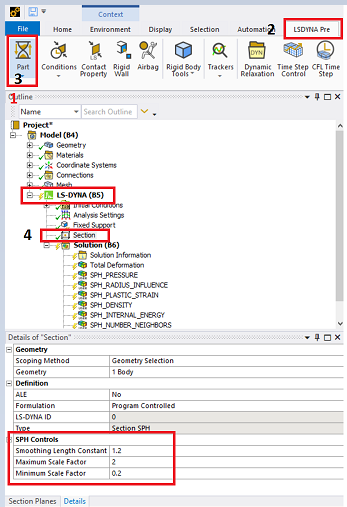
Step 1: First click on LS-dyna in tree, then you will see LSDYNA Pre tab. Step 2: Click on LSDYNA Pre, then click on Part in ribbon area. Step 3: Under PART you will find section option. Click on it to insert section. Step 4: Under details of section, you will see SPH controls.
regards
Amaniyar
November 6, 2021 at 7:38 am
vamsijc7
Subscriber
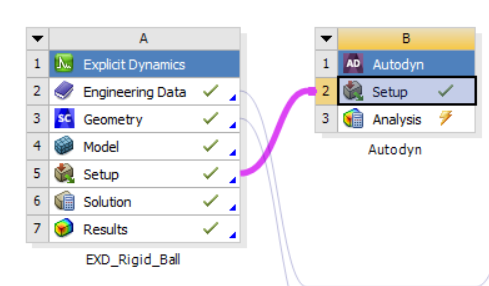
I want to change the smoothing length constant of SPH meshing in Autodyn solver instead of LS-Dyna.
I adopted this to validate a research paper, where they mentioned that they used ANSYS Autodyn solver and gave a smoothing length of 0.5 mm.
Could you please help me out ?
The Ansys Learning Forum is a public forum. You are prohibited from providing (i) information that is confidential to You, your employer, or any third party, (ii) Personal Data or individually identifiable health information, (iii) any information that is U.S. Government Classified, Controlled Unclassified Information, International Traffic in Arms Regulators (ITAR) or Export Administration Regulators (EAR) controlled or otherwise have been determined by the United States Government or by a foreign government to require protection against unauthorized disclosure for reasons of national security, or (iv) topics or information restricted by the People's Republic of China data protection and privacy laws.
Please Login to Report Topic
Please Login to Share Feed
Edit Discussion
You are navigating away from the AIS Discovery experience
The Ansys Learning Forum is a public forum. You are prohibited from providing (i) information that is confidential to You, your employer, or any third party, (ii) Personal Data or individually identifiable health information, (iii) any information that is U.S. Government Classified, Controlled Unclassified Information, International Traffic in Arms Regulators (ITAR) or Export Administration Regulators (EAR) controlled or otherwise have been determined by the United States Government or by a foreign government to require protection against unauthorized disclosure for reasons of national security, or (iv) topics or information restricted by the People's Republic of China data protection and privacy laws.


















 You are navigating away from the AIS Discovery experience