Fluids

Fluids

Topics related to Fluent, CFX, Turbogrid and more.

The udf for “PSI-C” method?

    • xsp2020
      Subscriber

      Can any researcher provide the udf for calculating the particle concentration in FLUENT DPM model using "PSI-C" method?

      I tried to write this udf, but after using both "DEFINE_DPM_SCALAR_UPDATE( ParticleCon,c,t,initialize,tp)" and "C_UDMI(c,t,0)+=P_FLOW_RATE(tp)*dt/C_VOLUME(c,t)" at the same time, the residence time of particles within a cell is always cumulative over all iteration time steps and is not only the final value. Besides, the concentration is always cumulative over the flow time steps.Any suggestion or comment is welcome!

      (the residence time dt= (P_TIME(tp)-P_TIME0(tp)))

    • Surya Deb
      Ansys Employee
      Hello,
      You can write a DEFINE_EXECUTE_AT_END UDF and then loop over all the injections and all the particles in those injections. Then you can use something like this within the loop:
      c = P_CELL(p);
      t = P_CELL_THREAD(p);
      C_UDMI(c, t, 0) += P_N(p) * P_MASS(p)/C_VOLUME(c, t);
      Check if P_N(p) is fetching the correct # of particles by testing a simple model.
      Regards SD
    • xsp2020
      Subscriber
      Hi sdeb
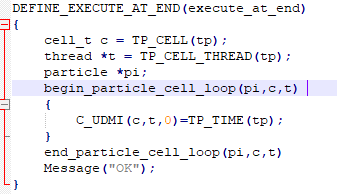
      Thanks for you answer. As a new to UDF, I tried the idea of particle loop based on the Fluent Customization Manual's example 2.5.12.3, the udf tested is shown below. Surprisingly, the contour output of UDM results is always 0. Could you please provide more information about your idea?
      Then, besed on my tests of comparison between "C_UDMI(c,t,0)+=C_VOLUME(c,t)"and"C_UDMI(c,t,0)=C_VOLUME(c,t)" in the "DEFINE_DPM_SCALAR_UPDATE( ParticleCon,c,t,initialize,tp)", the "C_UDMI(c,t,0)+=..." can successfully tracking the particles in every cell and display the gradient-changing contour,in which the inlet position is highest because more particles passed with the same cell volume. Hovever, it still exists the cumulative issues described in question. Due to the "0" resul of the particle loop method, i still couldn't try more parctices to validate its effectiveness.
      Thank you again for your enthusiastic reply.Looking forward to more ideas from you.
    • Amine Ben Hadj Ali
      Ansys Employee
      Your UDF is wrong: tp (tracked particle) is not defined in the EXECUTE_AT_END.
      in DEFINE_DPM_SOURCE you can store the Particle residence time and use it for any thing. If you want to get the particle concentration, there is another way to store it as Temp Value or use what Surya suggested.
    • xsp2020
      Subscriber
      HiDrAmine
      I agree with your point that tp (tracked particle) is not defined in the EXECUTE_AT_END. Before, I only suspect but am not sure, Thank you for helping me to improve my knowledge of udf.
      Then, the DEFINE_DPM_SOURCE is also tried. but i trapped in the trouble how to link the "source" to UDM that can be shown in contour. Could you provide a udf example or other information helpful to deal with this trouble.
      Thank you again for your enthusiastic reply.Looking forward to more ideas from you.

    • Amine Ben Hadj Ali
      Ansys Employee
      Examples are provided in the Customization Manual.
      With DEFINE_DPM_SOURCE you can easily calculate Residence time as you have State at Entry and State at Exit from the cell. From that you get the the time and you can do with it whatever you want like averaging, etc. Once you have done that it is time to store into a cell memory and here I recommend that you track particles using MPI and not Hybrid to avoid issues related to competing tasks (One can avoid these issues but that will require some further coding).
    • xsp2020
      Subscriber
      HiDrAmine
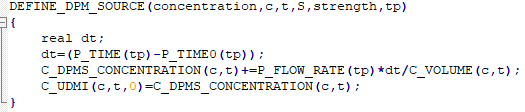
      After several attempts with the udf shown bellow, result cannot be obtained correctly due to unclear matters in the code. Could you please take another look at it for me? Thank you for your help with your previous reply.
    • Amine Ben Hadj Ali
      Ansys Employee
      Your UDF is wrong: C_DPMS_CONCENTRATION is actually the DPM Concentration you want to access which is already available. It is provided by Fluent: so no need to overwrite it.

Viewing 7 reply threads
  • The topic ‘The udf for “PSI-C” method?’ is closed to new replies.