Hello,
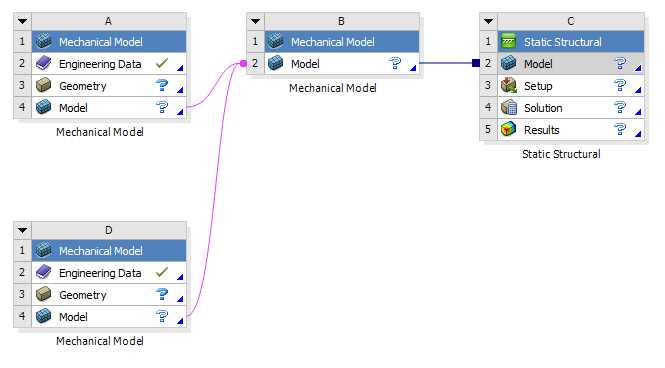
I have created two separate mechanical model components in workbench, loaded in geometry, applied mats, and meshed the models. With all checkmarks along Engineering Data, Geometry, and model, I then added a Static Structural component and tried to link the two mechanical models by r.click and dragging the model components to the new Static Structural block. This appears to successfully link my geometry and meshes.
After this step, I get update icons next to model in both of my mechanical models and a refresh icon next to my model in the static structural component. When I tried to update my linked model, Ansys crashes with the following error:
"AnsysWBU.exe encountered a problem. A diagnostic file has been written: C:Users..AppDataLocalTempWBDUmpFile.dmp" and then a follow about about losing connectivity, presumably because Mechanical crashed.
Additionally, when I try to open the now linked mechanical model in Ansys Mechanical, the program crashes with the same error. The behavior is the same if I only link a single mechanical model to the static structural component and try to update or open the model in Mechanical.
I am fairly new to Workbench. Does anyone have any thoughts on what's going on? I can't share my geom, but I'd be happy to share other debug files if they'd be useful.
Would it be worthwhile to try linking the geometry in Static Structural and then meshing the entire thing in the Static Structural, rather than meshing in my mechanical components first?
Thanks in advance!


















 You are navigating away from the AIS Discovery experience