

TAGGED: bladegen, turbomachinery
-
-
June 3, 2021 at 7:01 pm
ShwetaK
SubscriberHi,
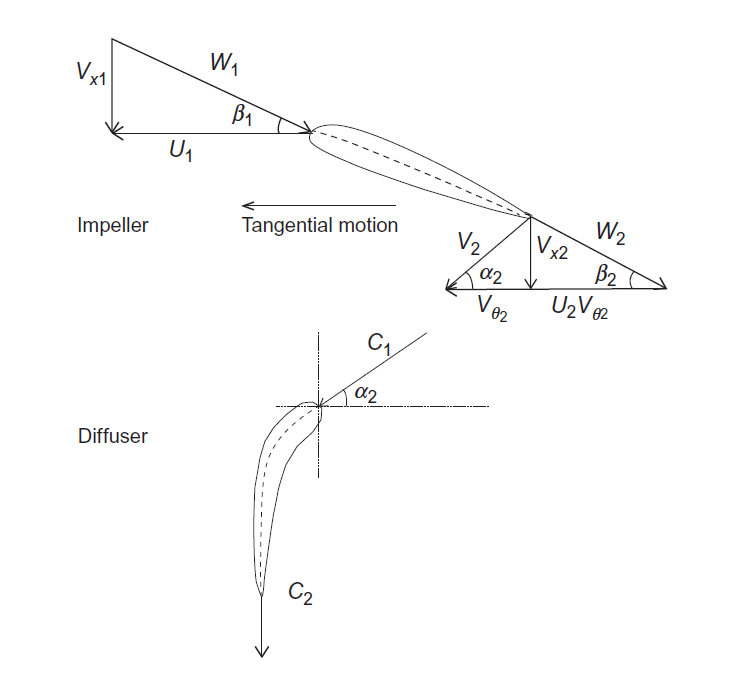
I am using cascade notation for the design of an axial impeller. The 3 parameters are - beta1 (impeller inlet angle), beta2 (impeller outlet angle) and chord length of impeller. How do I convert these to make a BladeGen model?
I have attached a picture of the cascade notation.
June 4, 2021 at 6:28 pmrfblumen
Ansys EmployeeAssuming you know the axial blade chord and inlet, outlet beta angles for the blade with respect to the axial direction, you can directly create a BladeGen model using those values:
1.) Drag BladeGen from the toolbox onto the WB project schematic and double-click to open BladeGen
2.) Go to File->New BladeGen Model
3.) From the Initial Meridional Configuration Dialog Box, select Simple Axial. Set the axial chord by adjusting the leading edge and trailing edge Z values in the input boxes.
4.) Using the default mode (Prs/Sct), set the leading edge and trailing edge beta values in the input boxes.
Once in BladeGen, you can adjust/change the model as needed
Viewing 1 reply thread- The topic ‘How to convert cascade notation parameters to BladeGen parameters to design axial impellers?’ is closed to new replies.
Innovation Space Trending discussions
 Top Contributors
-
peteroznewman
 5824
5824 -
scabo
 1906
1906 -
Dennis Chen
 1420
1420 -
javat33489
 1305
1305 -
Shyam Prasad V Atri
1021
Top Rated Tags
© 2026 Copyright ANSYS, Inc. All rights reserved.
Ansys does not support the usage of unauthorized Ansys software. Please visit www.ansys.com to obtain an official distribution.
-


The Ansys Learning Forum is a public forum. You are prohibited from providing (i) information that is confidential to You, your employer, or any third party, (ii) Personal Data or individually identifiable health information, (iii) any information that is U.S. Government Classified, Controlled Unclassified Information, International Traffic in Arms Regulators (ITAR) or Export Administration Regulators (EAR) controlled or otherwise have been determined by the United States Government or by a foreign government to require protection against unauthorized disclosure for reasons of national security, or (iv) topics or information restricted by the People's Republic of China data protection and privacy laws.

 You are navigating away from the AIS Discovery experience