Ansys Assistant will be unavailable on the Learning Forum starting January 30. An upgraded version is coming soon. We apologize for any inconvenience and appreciate your patience. Stay tuned for updates.
Fluids

Fluids

Topics related to Fluent, CFX, Turbogrid and more.

Periodic boundary condition in fluent meshing V2020.R2

    • smraniaki
      Subscriber

      Does anybody know how to apply periodic boundary conditions in Fluent meshing V2020.R2 update boundary condition tabs? I don't see the PBC among the list of BCs.

      After spending some time searching in this manner, I realized the periodic boundary condition in Fluent is not among standard BC you can find in the GUI and you need to manually add it via console. However, if the creation of a conformal mesh is essential for the periodic BC, this option has to be available in "Fluent meshing" as well which is not (or at least I couldn't find it via console). Anybody has ever faced this problem? or does anyone know if it's possible to apply periodic BC on a non-conformal mesh and fluent takes care of interpolating fluxes on cell faces to find the correct value on the shadowing patch?

      I tried applying Periodic BC on a non-conformal mesh and it didn't work, therefore I assumed this is a limitation with Fluent. please correct me if I'm wrong.

    • Rob
      Forum Moderator
      It won't as the periodic boundary is designed for perfectly matching meshes. Given this, we added the option to create a non conformal interface with periodic settings about 10-15 years ago: I use this pretty much every time. Set the two faces as interface zones (unique label) and then open up the Mesh Interfaces part of the tree.
    • smraniaki
      Subscriber
      ahh interesting! ´╗┐­ƒæì´©Å´╗┐
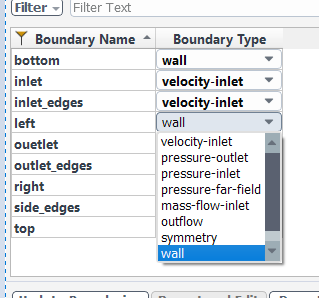
      when you said Interface zones, did you mean inside fluent meshing environment? I don't see those zones (boundary types) there. There is only "internal" which is not captured in the image below. If you meant later in fluent environment when set up the case, then what should I select in this stage (fluent meshing) for my periodic boundaries? apparently specifying the correct boundary in this stage results in a slight change of the final volume mesh. is there a documented tutorial or a video explaining that?


    • Rob
      Forum Moderator
      Use symmetry in Fluent Meshing to avoid inflation and change to interface in Fluent solver.
    • smraniaki
      Subscriber
      Thank you Rob,
      Just a recap for those who may see the post later, following is what I did to create a translational periodic boundary condition in fluent
      created my geometry and assigned symmetry boundary condition to two parallel patches (named left and right) in fluent meshing
      moved the mesh to fluent and changed the type to interface
      opened up the mesh interface from the setup tree and selected both patches (left and right) and clicked on create (as shown below).
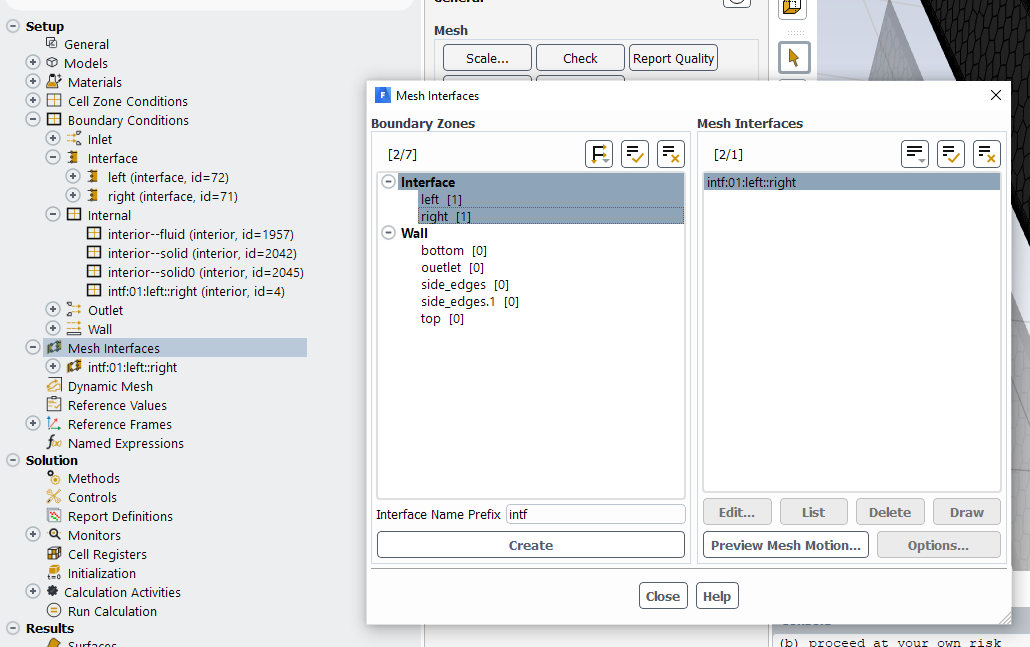
      Now things seem to be working and the model is running.
      Rob, is there any further adjustment that I missed?
      Thanks :)

Viewing 4 reply threads
  • The topic ‘Periodic boundary condition in fluent meshing V2020.R2’ is closed to new replies.
[bingo_chatbox]