TAGGED: computer-memory, cpu, cpu-time, multiple-cpu, user-defined-memory
-
-
May 10, 2021 at 7:26 pm
Alireza
SubscriberI want to set the NCPU for 40 or more than that, however , in the NCPU I can only choose 8. I was wondering how can I increase the number of CPUs in the LD-DYNA? is there a command for that? Appreciate any suggestions here,
Also, what memory shall I choose when I go with for example 40 cores?
May 12, 2021 at 10:21 amRam Gopisetti
Ansys EmployeeI guess you are familiar with the LS-RUN, Given the CPU are 40 and entered it in the NCPU it should not make any issue. Moreover, this shouldn't be confused with the virtual cores. It so happens that an computer might have only 6 physically cores and 12 virtual, if you enter 12 in NCPU, Solver will throw an exception. Some time Implicit might not accept AUTO memory then you can define the in Memory, IF the analysis is explicit type you can use AUTO and based in the size of the problem you might adjust the memory in terms of words.
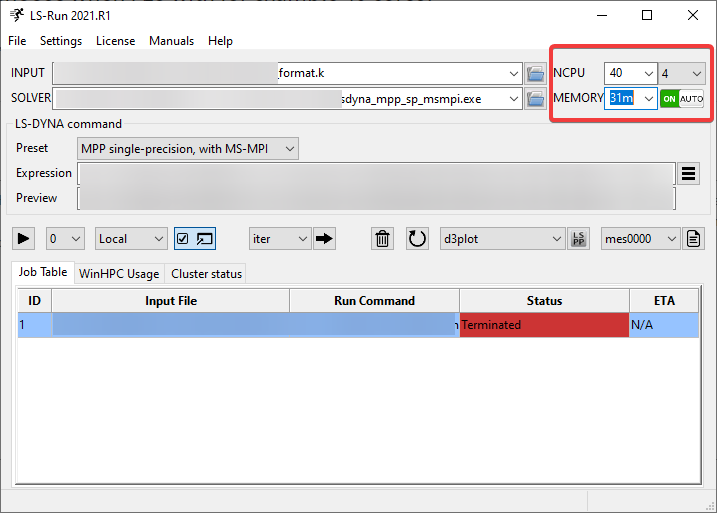
Comment down if you have any issues, Cheers, Ram

May 14, 2021 at 3:40 pmAlireza
Subscriber
Really appreciate your help, so in the case of the explicit dynamic simulation if my PC has 56 cores and a 1TB memory it would be ok to choose all 56 cores in the NCPU and choose the memory as for example 100m?
And regarding the Preset: I only have SMP solvers, is there any difference between the SMP and MMP when it comes to explicit dynamic simulation? and can I download the MMP solver from the LSTC website?
Thanks
Viewing 2 reply threads- The topic ‘Set Command Line Parameters’ is closed to new replies.
Innovation SpaceTrending discussionsTop Contributors-
4803
-
1582
-
1386
-
1242
-
1021
Top Rated Tags© 2026 Copyright ANSYS, Inc. All rights reserved.
Ansys does not support the usage of unauthorized Ansys software. Please visit www.ansys.com to obtain an official distribution.
-








