

-
-
May 4, 2021 at 4:25 pm
MattSigda
SubscriberI am making a mmWave Antenna and am trying to wrap a 0.33mm transmission line around 7.05mm radius cylinder. I am using the wrapped command the objects are overlapping in some places and not touching in other places. I have tried using an air gap but this is not perfect. The ground plane below was made by detaching a face form the inner wall of the cylinder. Also there is an artifact that is created on the top. Below are the errors I am receiving. For some reason not all of the elements are being wrapped. Also the bottom picture is the back (-x) view and the transmission lines are not wrapping correctly since they are not lines in that view.
May 5, 2021 at 8:41 amPraneeth
Ansys Employee
If you are referring to the overlapping and gaps that are visible as per the second picture, then please note that this might be because of the default rendering. If you want to make sure that your wrapping is good then you can change the render settings. Detailed information regarding this can be found under "Setting the Curved Surface Visualization" section of the HFSS Help document.
Please check the size of the cylinder for any objects which you could not wrap.
All the very best.
May 6, 2021 at 12:32 amSubscriberThank you. The overlap issue is resolved! ... but now I am getting two errors:
1) When I wrap the transmission lines and patches I get the warning:
[warning] Acis warning: "WrapSheet: Sheet does not touch next face with line contact."
2) I am shortening the lengths of some parts to simulate a switch opening and closing like:
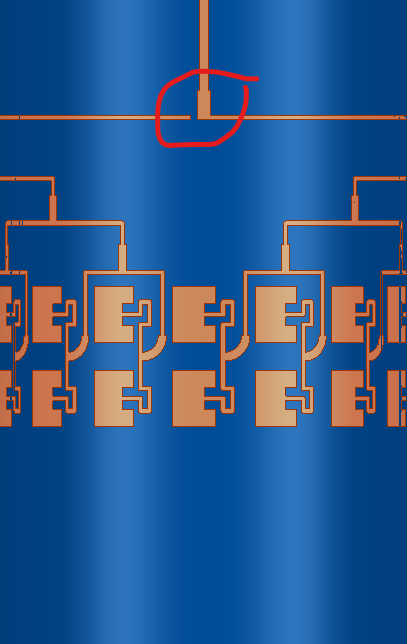 2 con't) When I do this I get these errors:
[warning] Acis warning: "Wrap Sheet: Invalid result. Sheet overlapped itself on wrap. Please check input. Possible causes are wrapping over a corner vertex or multiple turns over a periodic surface."
[warning] Acis warning: "WrapSheet: Could not wrap complete sheet on target object."
[warning] Acis warning: "WrapSheet: Unwrapped pieces are united together with wrapped pieces in result."
Is there any other way to create that gap? Since all of the components needed to be united to be wrapped, I lost boundary assignments when trying to just make the gaps lumped RLC boundaries or just non model objects
Thank you again for your help
May 6, 2021 at 2:03 pmAnsys Employee
I do not completely understand your issue.
In order to find out which objects are causing these warnings, please wrap each component separately and try uniting them afterwards as required.
In this way you might find the source for these warnings.
All the very best.
May 6, 2021 at 2:57 pmSubscriber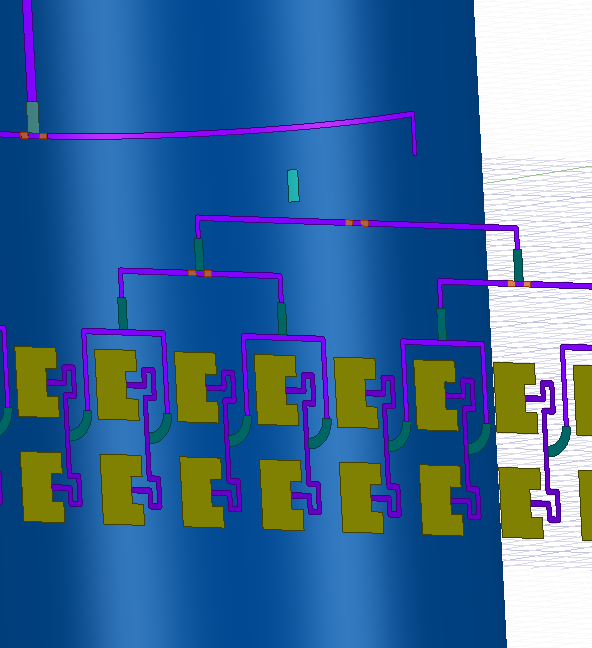 When individually wrapped, the sheets lose alignment
May 6, 2021 at 4:32 pmAnsys Employee
Please go through the "Wrap sheet command" section in the HFSS help document. It has detailed information on how you can use for your purpose.
All the very best.
May 7, 2021 at 1:14 amAndyJP
SubscriberThat is a common problem in HFSS.
The 3D modeller uses true curves. But the solver uses linear meshes even when the EM field is solved in curvelinear coordinates (there was no such option 10 years ago, but the modeller and the mesher did not change much since then). Usually, every iteration will produce a new mesh which will eventually intersect somewhere. There is no mechanism for avoidint this problem in HFSS.
Your only option is creating a linear (triangular faceted) mesh outside of HFSS and importing it as is. Faceted objects are re-meshed without distortions when solving.
Another option is creating a buffer dielectric layer where all your metal patches reside completely, so the solver will substract the iterative mesh automatically from this layer wtih no errors. This can be simply an airbox and the metal patches "floating" above the substrate in it.
Viewing 6 reply threads- The topic ‘Issues with wrapping patch array: overlap/not touching’ is closed to new replies.
Innovation Space Trending discussions
 Top Contributors
-
peteroznewman
 5094
5094 -
scabo
 1829
1829 -
Dennis Chen
 1387
1387 -
javat33489
 1248
1248 -
Shyam Prasad V Atri
1021
Top Rated Tags
© 2026 Copyright ANSYS, Inc. All rights reserved.
Ansys does not support the usage of unauthorized Ansys software. Please visit www.ansys.com to obtain an official distribution.
-



The Ansys Learning Forum is a public forum. You are prohibited from providing (i) information that is confidential to You, your employer, or any third party, (ii) Personal Data or individually identifiable health information, (iii) any information that is U.S. Government Classified, Controlled Unclassified Information, International Traffic in Arms Regulators (ITAR) or Export Administration Regulators (EAR) controlled or otherwise have been determined by the United States Government or by a foreign government to require protection against unauthorized disclosure for reasons of national security, or (iv) topics or information restricted by the People's Republic of China data protection and privacy laws.

 You are navigating away from the AIS Discovery experience