Ansys Learning Forum › Forums › Discuss Simulation › General Mechanical › Combine 2 db files into one assembly › Reply To: Combine 2 db files into one assembly
 Huijuan
Hello @Huijuan APDL cant read two db file but it can read cdb file. You can export one db file as cdb file. Resume another db file and then import the cdb file in it. You might need to use NUMOFF that goes along with the CDWRITE command to offset the element,node numbers. Please check the Ansys help for more details of the commandshttps://ansyshelp.ansys.com/account/secured?returnurl=/Views/Secured/corp/v211/en/ans_cmd/Hlp_C_CmdTOC.htmlThe another way is you can export both cdb file. In Workbench you can import them using two 'External model' and combine them in single analysis system. From the analysis you can write the APDL input file.https://us.v-cdn.net/6032193/uploads/YIEYTVXOS3DE/2021-02-04-21-05-15.png/forum/discussion/comment/105635#Comment_105635
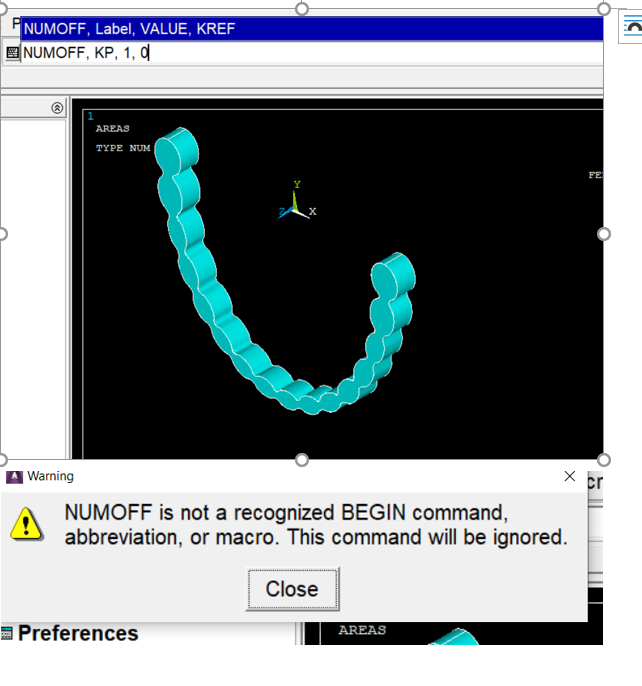
Hi @rkumbhar, thanks for the methods, but I still encounter some issues when I trying to combine them together. Would you help me to take a look? I created two models and meshed them then use the CDWRITE command. nIs this the right way to set up the files to read on mechanical apdl? I used CDWRITE, ALL, , CDB, , Aligner, , blocked for the CDWRITE code. for both of my files, but when I imported on workbench, linked them together and open on APDL, it was empty. nHow should I command the NUMOFF? I couldn't see the link you shared, probably because I am holding on student's license.n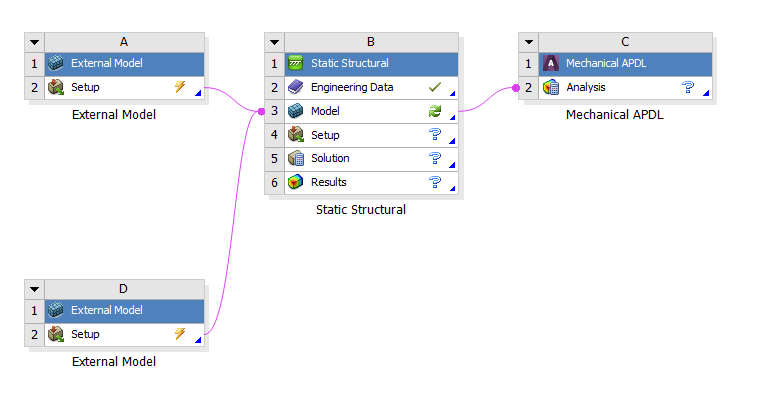
 n
n

 You are navigating away from the AIS Discovery experience

