Ansys Learning Forum › Forums › Discuss Simulation › General Mechanical › Issues with Static Structural Simulation of a Multi-Leaf Spring › Reply To: Issues with Static Structural Simulation of a Multi-Leaf Spring
 peteroznewman
You don't have two elements through the thickness.
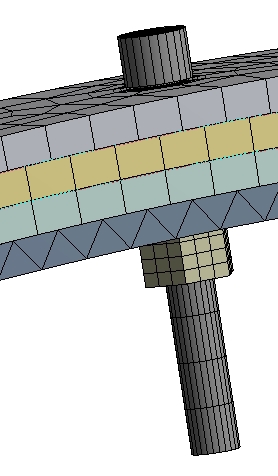
You have both Bonded Contact of the Bolt shaft to each hole, and you have Bolt Pretension, which can't work properly with the Bonded Contact. I suggest you delete Bolt Pretension. If you do that, you don't need a 2 step solution and you don't need the nut.
If you decide to delete the Bonded Contact of the Bolt Shaft to each hole, then Under Analysis Settings, for Step 2, Auto Time Stepping should be On and the Initial Substeps set to 100. but if you delete the Bolt Pretension and have only Step 1, then use the same settings there.
You put 6 NR Residual plots under the Solution Information folder, did you look at them? With one element you can see where the problem is. Remesh with 2 elements through the thickness. Set the Mesh to use Quadratic elements since you have long curved faces, you don't want flat facets on linear elements. It would be better if you can make fewer elements along the length and width while maintaining the 2 elements through the thickness. That way there are fewer nodes in the contact definition that have to resolve contact.
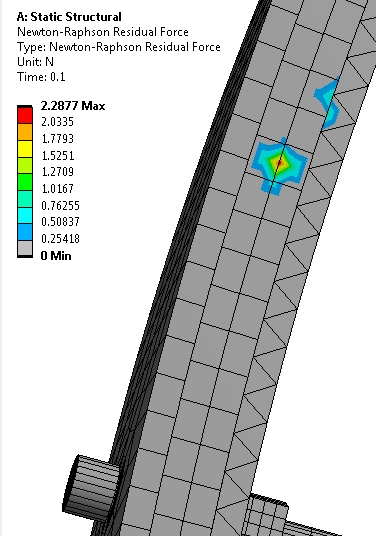
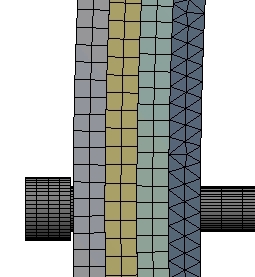
You might benefit from changing the Frictional Contact Normal Stiffness Factor to 0.01 but after it solves, check if the penetration is acceptable. All three frictional contacts can have the Update Stiffness set to Each Iteration.
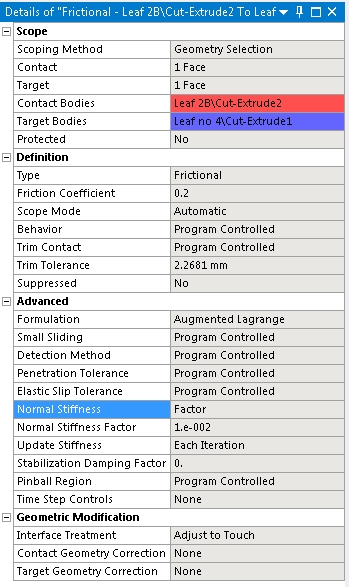
Insert a Contact Tool under the Connections folder and check initial contact status. One contact is Near Open.
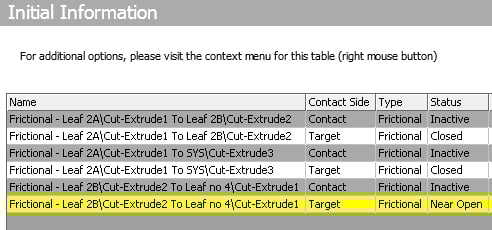
On that contact, change it to Adjust to Touch. You can do that to the other two also as it will help the solver to start.

I also recommended that you use a Displacement input instead of a force input. That will also make it easier for the solver to converge. You can put a remote displacement on the head of the bolt and push in the Y direction, you then request a Force Reaction on this Remote Displacement. I tried -50 mm.
Another suggestion with the Bolt Preload deleted and the Remote Displacement, it can be helpful to still have a 2 step solution. In step 1, the remote displacement is set to 0. That is just to let the contact resolve itself, then in step 2, the head starts moving in -Y.
A final suggestion is to insert a Command into your model, NEQIT,50
This command will tell the solver to keep iterating for 50 attempts before bisection. You can even tell it to use 100 iterations. The default is 26 iterations. Below is the Force Convergence graph for a 2 step model with adjust to touch and a -50 mm displacement. It is attempting 1% of that or 0.5 mm and it will need a lot of iterations for the contact to resolve because you have large surface area in contact. But look, it took more than 26 iterations, then gave a converged substep, we are off and running!
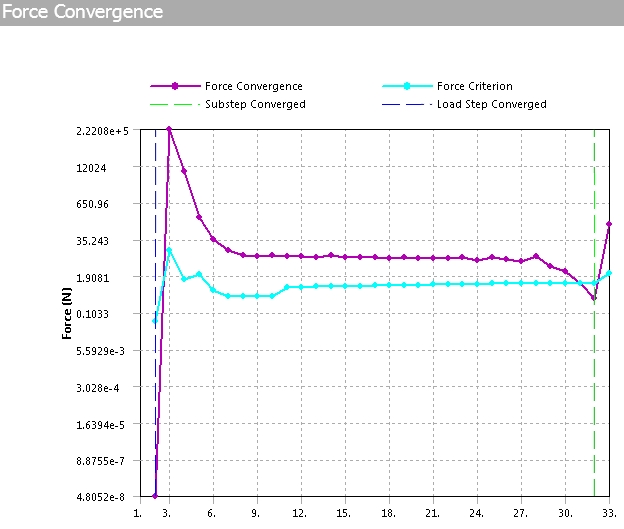
If it didn't converge with 50 (or 100) iterations, I would look at the NR Residual Force Plot and improve the element shape or reduce the element size in that area.
With two elements through the thickness, it will take a lot longer to solve, but if you cut it down to a 1/4 model as I suggested, it would solve 10 times faster.
If you convert this to a 2D plane stress model, it would solve 100 times faster.

 You are navigating away from the AIS Discovery experience

