Electronics

Electronics

Topics related to HFSS, Maxwell, SIwave, Icepak, Electronics Enterprise and more.

Script Error (code 80070202) in Ansys SIWave

TAGGED: 

    • swfisher
      Subscriber

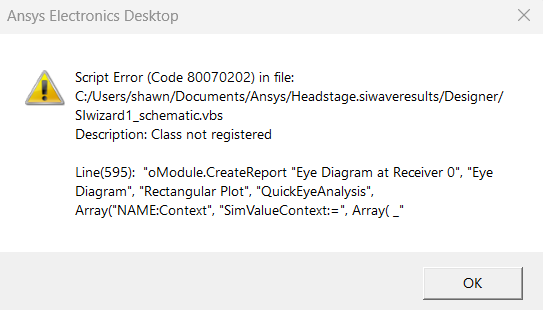
      This is my first time using the ANSYS SIWave software and I keep receiving the same error whenever I try to run a simulation through the SIWizard (photo below). The imported PCB passes the validation check without errors and the error code occurs regardless of whether custom or default excitation sources are used. Does anyone have knowledge on how to resolve this issue? Happy to provide additional information about SIWizard parameters if helpful.

    • Takeshi Itadani
      Ansys Employee
      If you encounter the message "Class not registered" when running an analysis with SIwave's SIWizard, this is usually because a required component or library is not properly installed or is not registered in the Windows registry. Because SIwizard and TDRwizard reports are opened in the Ansys Electronics Desktop, this error can occur if the associated software or dependencies are missing.
       
      ・Be sure to log in to Windows with administrator privileges. 
      ・Uninstall the existing SIwave from the Control Panel. 
      ・Restart your PC and clear any unnecessary temporary files and registry remnants. 
      ・Download the latest version of the installer from the official website or license management system. 
      ・During installation, right-click the installer and select "Run as administrator" and follow the instructions to complete the installation. 
      ・After the installation is complete, restart your PC again.
       
      If the problem persists, please also check the following:
      ・Run Windows Update to keep your OS and related components up to date. 
      ・Check that libraries that SIwave depends on, such as the .NET Framework and Visual C++ Redistributable, are up to date. If necessary, reinstall them from the official Microsoft website. 
      ・Check that antivirus or security software is not interfering with installation or execution.
    • swfisher
      Subscriber

      Hello,

      Thank you for your response. I have checked and reinstalled .NET Framework and Visual C++ Redistributable, this had no effect. For some reason ANSYS (including SIWave and other applications) are not visible under Programs and features in the control panel. I tried using the ANSYS uninstallation program and reinstalling with the installer run as adminstrator but this did not have any effect. I should note that the way my University distributes ANSYS is through a Microsoft sharepoint containing folders for ANSYS electronics, fluids, etc. Inside the electronics folder there is an application named "setup" which lets me install the program.

    • Takeshi Itadani
      Ansys Employee

      Please contact your university's IT department, as you may not have sufficient permissions or files added due to some restrictions being missing.

Viewing 3 reply threads
  • You must be logged in to reply to this topic.