Ansys Assistant will be unavailable on the Learning Forum starting January 30. An upgraded version is coming soon. We apologize for any inconvenience and appreciate your patience. Stay tuned for updates.
Fluids

Fluids

Topics related to Fluent, CFX, Turbogrid and more.

Particle tracking during unsteady RANS calculation with sliding mesh

TAGGED: 

    • nilotpalc
      Subscriber

      Hello everyone,

      I have a question on CFX particle tracking and would like your valuable insights on that.

      I am running an unsteady RANS simulation of an axial flow compressor with a sliding mesh. The simulation consists of (1) aerothermal calculations to obtain the flow field and (2) particle tracking, in which particles are injected and tracked through one-way coupling with the flow. The aerothermal calculation is very expensive; particle tracking is cheaper, but I need to study many kinds of particles (think of a parametric study). Also, during particle tracking, I want the flow field to keep changing. I can think of two ways to achieve this:

      One, keep solving for the fluid on the fly as particles are injected and travel through the domain. However, this is very expensive.

      Two, perform the aerothermal calculation once, save the flow field at different timesteps, and then perform particle tracking by loading the saved unsteady solutions as particles are tracked.

      Challenge: I found that it is possible to turn the fluid solver off while particles are tracked. So, after the simulation is initiated, the flow field in the first time step is loaded. As time goes, particles are tracked, and the rotor also rotates. However, the flow field is not updated.

      Solution: Is it possible to update the flow field as particles are tracked? If this is not possible within the software, can a workaround be developed? Like PyAnsys?

      For example, let’s say I have a fluid time step of 1 s and saved the flow fields at t = 1, 2, …, N s in a previous aerothermal calculation (time step of 1 s). Can I build a script to (a) initiate the simulation using flow solution at t=1s, (b) track particles till time reaches 2 s (end of the 1st time step), (c) reinitialize/change flow field using the saved flow solution at t = 2s and continue particle tracking? This process is repeated every time step.

      P.S. - In step (c), if particles cannot be continuously tracked from the previous step, I can also inject particles using their information at t= 2s and restart the tracking process.

      Thank you!

    • RS
      Ansys Employee

      In a multiphase particle tracking simulation, particles movement is typically dependent on the flow conditions. When flow is disabled, the particles may not move. Particles movement is generally coupled with the flow dynamics.
      While solving Navier-Stokes equations, the particles are added as an extra source term in the Momentum equation.  If Flow is disabled, no driving force on the particles

    • nilotpalc
      Subscriber

      Hi Ravi,

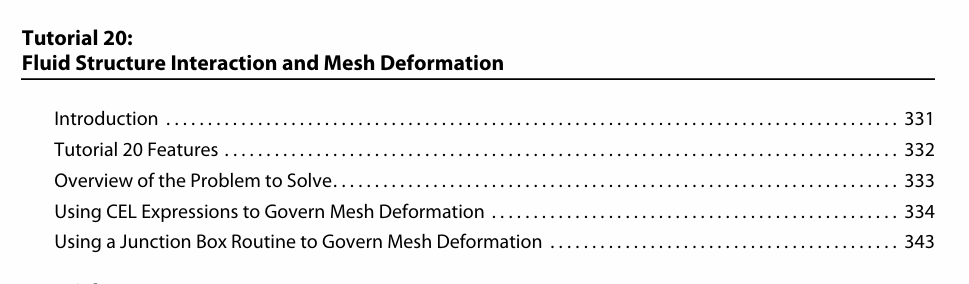
      Thanks for your answer. You are right in that without the source term from the fluid, particles cannot move. But in my case, particles already have an injection velocity at the beginning, so they are gonna move. Now the domain in which they are moving has two aspects: 1) Momentum source from the fluid solution used to initialize the simulation (think of a frozen fluid state) 2) Rotating parts in the domain. So particles would experience drag force and rebound forces from the walls of the domain (where I specify rebound models). If it is not clear, I want to load different .trn files at the end of each timestep of the simulation, so that particles experience fluid forces even if fluid solver is turned off. I think it is possible as I found an example from an old tutorial in CFX 11.0 where mesh files are loaded at the end of each timestep of a transient simulation, using junction box routine. Do you know if I can load .trn files similarly? I have attached a ss of the tutorial for your reference, unfortunately I couldn't find the fortran source codes for the junction box routines used in the tutorial and available in CFX 11.0 installation.

    • nilotpalc
      Subscriber

      Hi, I have a related question to this. I have a case of quartz particles being transported with air in a domain. I am trying to implement a user defined particle-wall interaction through a Particle User Routine. This routine takes in two arguments - Quartz.Particle Impact Angle and Quartz.Velocity on a wall. It returns two things - the perpendicular and parallel coefficient of restitution. I am using a Particle User Routine because neither a CEL expression nor a general User Fortran can access the particle impact angle, a track variable.
      I've attached an image of the settings. To use this routine, I turned on User Wall Interaction (inside the blue oval) and used the Particle User Routine I defined. The problem, however, is that I am unable to turn off the default wall interaction (inside the red oval), which is making CFX throw an error in Solution Manager, at the end of the simulation. Do you have a solution to this? I can bypass doing a transient run if this works.

      Image preview

Viewing 3 reply threads
  • You must be logged in to reply to this topic.
[bingo_chatbox]