
Geometry Preparation Using Ansys Discovery Software — Lesson 1
Whenever our geometry contains rotational parts, it is essential to create rotational zones (enclosure) around the body, particularly around the blades, to accurately capture the effects of rotating motion on the surrounding airflow. The rotating zone helps in capturing blade-induced flow effects, as the motion of rotor blades generates complex aerodynamic forces, including lift and thrust. It enables the CFD solver to realistically simulate air movement, including induced flow patterns and turbulence. Additionally, rotational zones play a crucial role in modeling wake and vortex structures. The rotation of the blades produces tip vortices and wake effects, which impact the quadcopter’s efficiency and stability. Without a rotational zone, the solver would not correctly capture the wake interactions between the blades and the surrounding air, leading to inaccurate simulation results.
Student teams can apply for a free research license here.
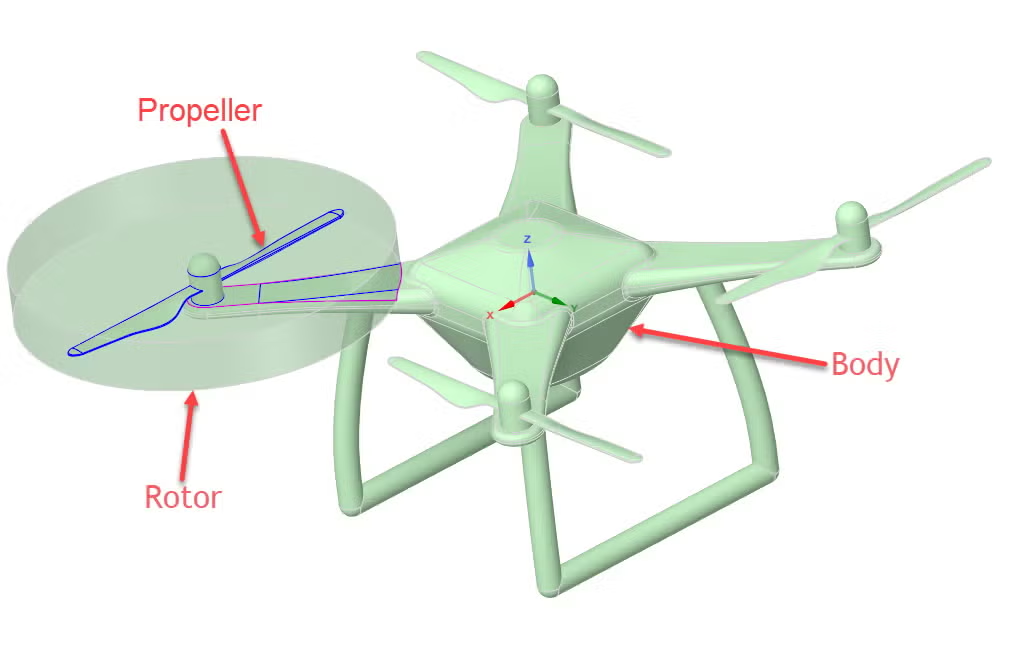
This video shows the geometry creation in Ansys Discovery™ 3D product simulation software for a Quadcopter. It contains step-by-step directions of how to clean the geometry, generate regions, add names and create enclosure around the body.

You are being redirected to our marketplace website to provide you an optimal buying experience. Please refer to our FAQ page for more details. Click the button below to proceed further.