-
-
May 9, 2019 at 8:41 am
gunjanauti
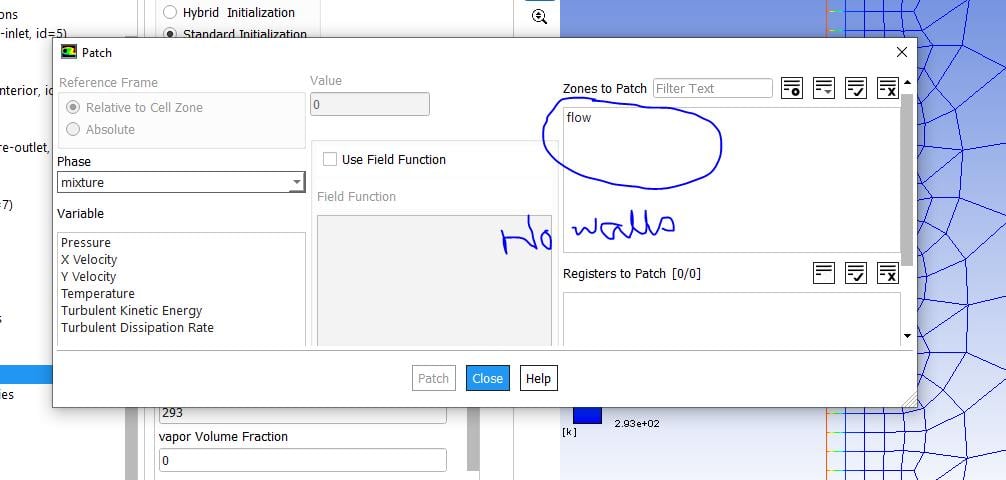
SubscriberHow to apply initial conditions for the wall in fluent 2D simulation? For example I have to simulate a flow inside a pipe with initial wall temperature = 400K and cold water cools the the pipe wall because of the forced convection. How do I set the initial temperature? There is no wall zone in the patching
Â
-
May 9, 2019 at 6:37 pm
Karthik Remella
AdministratorHello,
Patch option in Fluent is used for initializing a small region inside your computational domain. In your case, since the wall is a boundary, you could apply this initial condition using the 'Standard Initialization' option. This will apply this temperature everywhere in your computational domain (including the walls). You can check this by plotting your temperature contours after your initialize the problem.
Thanks.
Best,
Karthik -
May 11, 2019 at 10:09 am
gunjanauti
SubscriberIn eulerian phase model it asks for temperature of each phase at t=0. Now, I have liquid water as primary phase and walls at 1200K initially. Obviously, I can't put temperature of liquid water 1200K at t=0. (Physically not possible). In that case, how do I set the initial wall temperature? (Even if I mark the boundary and try to patch the temperature, it asks for liquid and vapor phase differently)
-
May 13, 2019 at 5:15 am
DrAmine
Ansys EmployeeJust set the wall temperature to what you want at the wall itself. -
May 13, 2019 at 6:08 am
gunjanauti
SubscriberCan you please elaborate? There is no option such as 'Wall Temperature' in eulerian multiphase model. -
May 13, 2019 at 9:24 am
DrAmine
Ansys EmployeeNo. Just provide the right temperature at the boundary itself. Patch the cell zones with the correct phase temperature values.
-
- The topic ‘Initial Conditions for the walls’ is closed to new replies.
-
6495
-
1906
-
1458
-
1308
-
1022
© 2026 Copyright ANSYS, Inc. All rights reserved.