-
-
September 20, 2018 at 3:00 pm
martijn.ruijzendaal
SubscriberHi,
I’m having issues with selecting a boundary for an inflation layer in the Fluid Flow (Fluent) Meshing window. Below is a screenshot of the window I’m referring to:
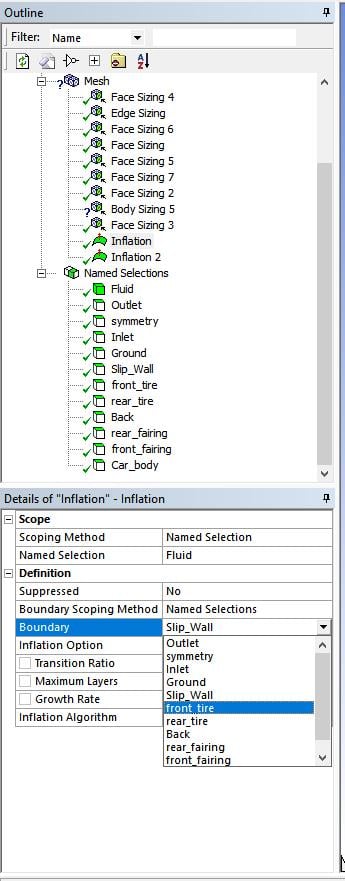
My issue is that I can not select the front_tire named selection (or any selection for that matter) and the Boundary remains stuck on Slip_Wall. I’ve also tried changing the Boundary Scoping Method to Geometry Selection, but the selected geometries are not persisted using that method either.
Â
Any advice on how to solve this problem is much appreciated.
Â
Thanks in advance.
-
September 20, 2018 at 11:36 pm
klu
Ansys EmployeeHi, can you please post a couple of screenshots that show how the geometry looks like? It would be great if you can mark the "Fluid" zone and "front_tire" boundary.
-
September 25, 2018 at 5:02 am
Keyur Kanade
Ansys EmployeePlease make sure that named selection 'Fluid' has correct bodies selected.Â
If you are trying to select faces which are not part of bodies in 'Fluid' then it may not be selected.Â
Regards,
Keyur
-
September 25, 2018 at 8:25 am
martijn.ruijzendaal
Subscriberkkanade,
Thank you. I was trying to create a mesh of a body inside a seperate fluid box body. Thanks to your answer, I was able to subtract my shape body from the fluid body and select the boundary faces correctly.
-
September 25, 2018 at 12:59 pm
Keyur Kanade
Ansys EmployeeGlad that your issue is resolved.Â
Regards,
Keyur
-
- The topic ‘Inflation layer boundary selection’ is closed to new replies.
-
6495
-
1906
-
1458
-
1308
-
1022
© 2026 Copyright ANSYS, Inc. All rights reserved.








