-
-
February 12, 2024 at 3:38 pm
-
February 13, 2024 at 6:16 am
Devendra Badgujar
Forum ModeratorHello Felipe,Â
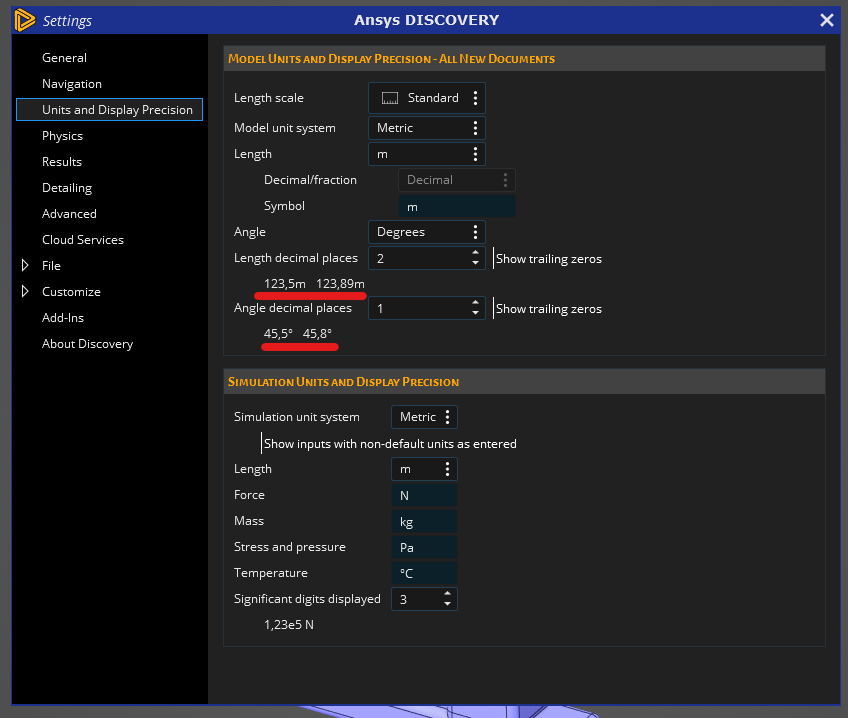
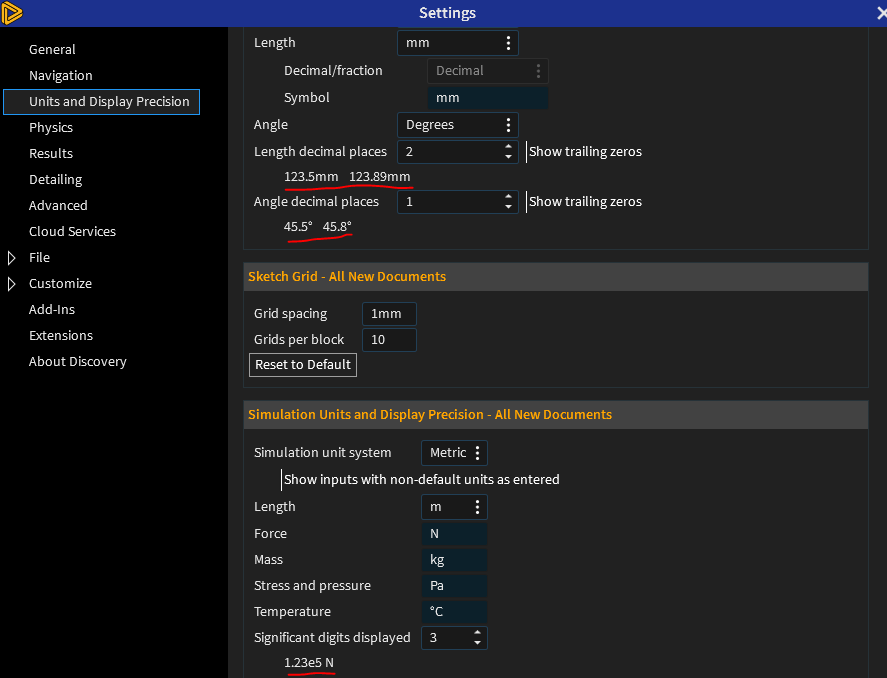
Which version of Discovery are you using? Those are points only. When you select the length decimal places and if you use Imperial units, you can select Decimal/Fraction to display distance measurements that are less than 1 unit.
Select Show trailing zeros option to display trailing zeros in decimal measurements.
I hope this answers your question.
Regards,
DevendraÂ
-
February 13, 2024 at 3:15 pm
felipefreiredecarvalho
SubscriberÂ
Hi Devendra,
I’m using 2023 R2 version, but it’s a student version, and the options I’m using are same the image above, I selected the "Show trailing zeros" option and it didn't change the comma.
Thank you so much for support.
Â
-
February 13, 2024 at 3:45 pm
Devendra Badgujar
Forum ModeratorHi Felipe,Â
Thanks for your reply. The commans shown might be some UI issue in Student version of 2023 R2, can you please try 2024 R1 Student version of Disocvery and see if that works. Anyways, the commas shown in 23.2 acts as points only so should not be problem.Â
Regards,
DevendraÂ
-
February 13, 2024 at 5:37 pm
felipefreiredecarvalho
SubscriberOk, can I do install the latest version refreshing the 2023 R2 version?
Â
-
February 14, 2024 at 5:19 am
Devendra Badgujar
Forum ModeratorHello Felipe,Â
You can either install the new 2024 R1 Student version of Discovery directly without unisnatlling the earlier version. If you would like to free up some space, you can uninstall the 2023 R2 after the latest version is installed. Â
Download Ansys Student | Workbench-based Simulation Tools
Let me know if you have further questions.
Regards,
Devendra
-
- The topic ‘How to change comma to point in ANSYS Discovery?’ is closed to new replies.

-
6495
-
1906
-
1458
-
1308
-
1022
© 2026 Copyright ANSYS, Inc. All rights reserved.