

TAGGED: cfd, fill, internal-flows
-
-
January 8, 2022 at 6:17 pm
TPanais
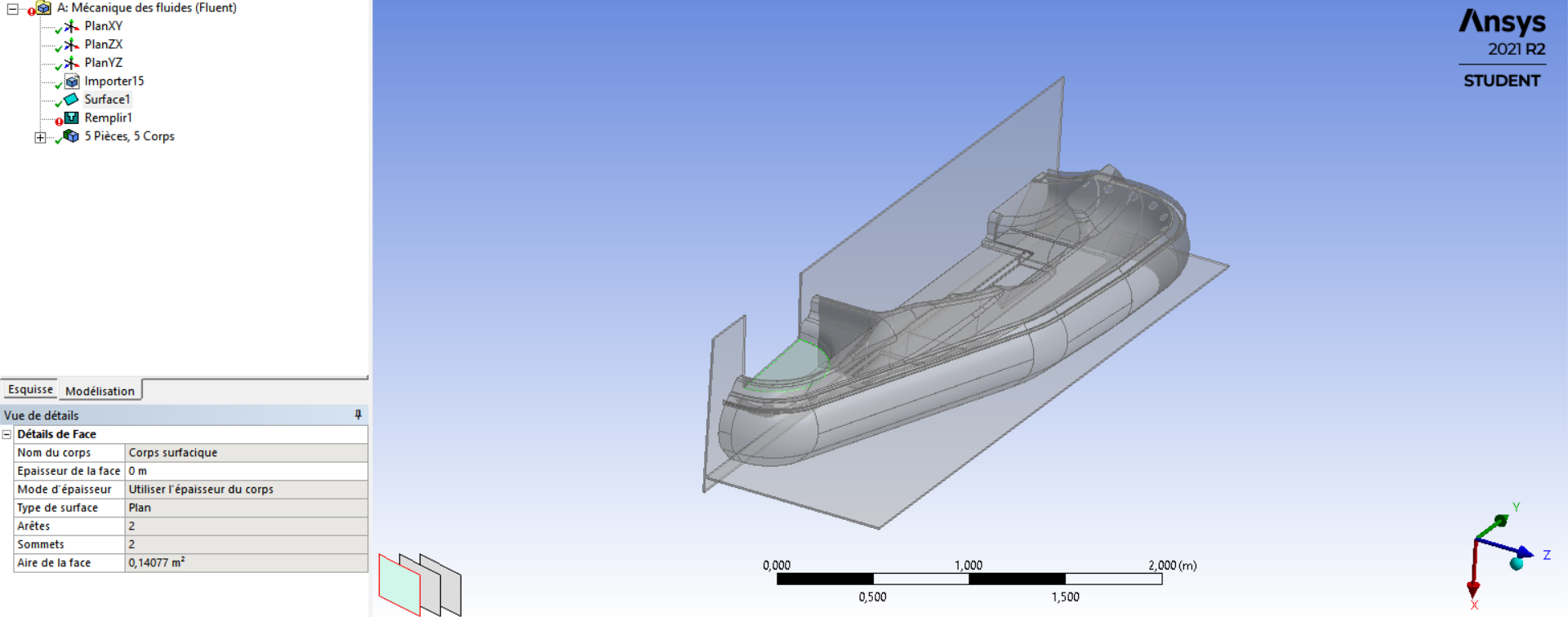
SubscriberHi, I'm working on the flow of air inside of a hovercraft. I have cut it in half and sealed the side and bottom in Solidworks. I have then created a surface on the intake to seal the inside to then use the fill function and create the inside geometry of the hovercraft. When I try this an error tells me it's impossible to create the inverse geometry of my file. Does anyone have an idea of how to fix this issue? I'll be quick to answer any question
January 10, 2022 at 3:58 amKeyur Kanade
Ansys EmployeeIt looks you have imported surfaces. From image it looks like you need to carry some geometry operations before creating solid from surfaces.
The caps should be confined with the edges and should not extend beyond.
Please check if there are any missing faces. You can try on some small geometry first. Then use this geometry which has many faces.
Please see Create - Body Operation - Sew option to create solid from surfaces.
Please go through help manual for more details
You can also check SpaceClaim.
Also if you are using student version, make sure that you simplify your geometry considering 512K cells limitation of meshing.
Regards Keyur
How to access Ansys Online Help Document
Guidelines on the Student Community
Viewing 1 reply thread- The topic ‘Fill function not working ( unable to create inverse geometry )’ is closed to new replies.
Innovation Space Trending discussions
 Top Contributors
-
peteroznewman
 6495
6495 -
scabo
 1906
1906 -
Dennis Chen
 1458
1458 -
javat33489
 1308
1308 -
Shyam Prasad V Atri
1022
Top Rated Tags
© 2026 Copyright ANSYS, Inc. All rights reserved.
Ansys does not support the usage of unauthorized Ansys software. Please visit www.ansys.com to obtain an official distribution.
-


The Ansys Learning Forum is a public forum. You are prohibited from providing (i) information that is confidential to You, your employer, or any third party, (ii) Personal Data or individually identifiable health information, (iii) any information that is U.S. Government Classified, Controlled Unclassified Information, International Traffic in Arms Regulators (ITAR) or Export Administration Regulators (EAR) controlled or otherwise have been determined by the United States Government or by a foreign government to require protection against unauthorized disclosure for reasons of national security, or (iv) topics or information restricted by the People's Republic of China data protection and privacy laws.

 You are navigating away from the AIS Discovery experience