
Pre-Analysis & Start-Up — Lesson 2
Ansys Student software can be downloaded for free here.
Pre-Analysis
There are three different theories for finding the solution for the bending of a curved beam. There is elasticity theory, where
$\sigma_r = (\frac{4M}{tb^2N})[(1 - \frac{a^2}{b^2}\ln(\frac{r}{a}) - (1 - \frac{a^2}{b^2})\ln(\frac{b}{a})]$
and
$\sigma_\theta = (\frac{4M}{tb^2N})[(1 - \frac{a^2}{b^2})(1 + \ln(\frac{r}{a})) - (1 + \frac{a^2}{r^2})\ln(\frac{b}{a})]$
where
$N = (1 - \frac{a^2}{b^2})^2 - 4(\frac{a^2}{b^2})\ln^2(\frac{b}{a})$
There is Winkler-Bach Theory, where
$\sigma_x = \frac{M}{AR}[1 + \frac{y}{Z(R + y)}]$
where
$Z = -1 + \frac{R}{h}\ln[(R + \frac{h}{2}) / (R - \frac{h}{2})]$
And there is the straight beam theory, where
$\sigma_x = \frac{My}{I}$
Start-up
1. Now, let's load the problem into Ansys Mechanical and see how a computer simulation will compare. First, start by downloading the files here
The zip file should have the following contents:
- Curved Beam Solution_files folder
- Curved Beam Solution.wbpj
Please make sure to extract both of these files from the zip folder; the program will not work otherwise.
2. Double click "Curved Beam Solution.wbpj," which should automatically open Ansys Workbench (you have to twiddle your thumbs a bit before it opens up). You will be presented with the Ansys solution.
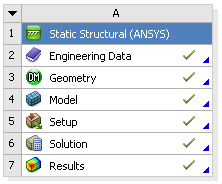
A tick mark against each step indicates that that step has been completed.
3. To look at the results, double click on "Results." This should bring up a new window (again you have to twiddle your thumbs a bit before it opens up).
4. On the left-hand side there should be an "Outline" toolbar. Look for "Solution (A6)."
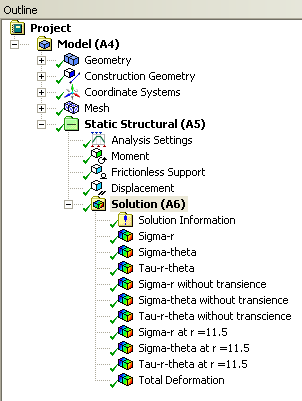
We'll investigate the items listed under Solution in the next step in this tutorial.

You are being redirected to our marketplace website to provide you an optimal buying experience. Please refer to our FAQ page for more details. Click the button below to proceed further.